

What online appointments change compared to email ping-pong
An appointment by email rarely takes fewer than four messages: request, proposals, acceptance, confirmation. In between lie hours or days in which both sides wait for each other. For a practice that is annoying. For a business that wants to win new customers, it costs inquiries.
How quickly interest cools is shown by a 2011 Harvard Business Review analysis of 1.25 million web inquiries at 42 US companies. Those who responded within an hour were nearly seven times as likely to have a real conversation with a decision maker. The comparison group replied an hour later. Compared with a reply after 24 hours, the odds were more than sixty times higher.
The study measures how fast sales teams respond to an inquiry, not online booking. But it shows what waiting costs. That waiting disappears when the inquiry itself is already the appointment. The free times are on the website, at 10 pm and on Sunday too. Whoever books commits while interest is still fresh.
With online appointment booking, the booking system reads your calendar and shows only free times on the website. Every booking lands in both calendars. Confirmation, reminder and the link for rescheduling arrive automatically by email.
How appointment booking works on a website
The basis is the connection to the calendar you already use, whether Google, Microsoft 365 or Apple. The booking system checks there when you are busy and calculates the free times from that. It then shows them per appointment type, for example an intro call of fifteen minutes or a consultation of 45 minutes.
Whoever books enters their name, email address and the details you defined beforehand. Both sides receive a confirmation with a calendar entry, and for video appointments the link to the call is included. Anyone who needs to reschedule uses the link in the confirmation and picks a new time, without calling.
Rules first, then the technology
Connecting the calendar is quick. The rules need more thought, because they reflect how your day actually runs. Without them, someone books an 8 am appointment at 7:50 am, or four intro calls follow each other without a break.
There are numbers for the last rule. A review by the Cochrane Collaboration evaluated studies on SMS reminders before doctor and clinic appointments. Without a reminder, 67.8 percent of people showed up for their appointment, with an SMS reminder 78.6 percent. The studies come from healthcare and do not show whether the effect is equally large for consulting appointments. But an email reminder costs nothing, while a forgotten appointment costs the entire reserved time.
Widget or a calendar in your own design
There are two ways to get booking onto the website. The quick way is an embedded widget, a piece of the provider's code that places its booking calendar into your page. The second way only fetches the free times and shows them in a calendar that belongs to the website. The booking then runs through the website's server.
| Embedded widget | Calendar in your own design | |
|---|---|---|
| Installation | Code snippet, inserted in minutes | Development, once during the build |
| Appearance | The provider's design, limited customization | Fonts, colors and tone of the website |
| Load time | Third-party code loads along in the embedded window | The page only loads the free times |
| Tracking | Booking runs in the provider's window | Every step visible in your own analytics |
| Switching providers | New widget, new look | Swap the booking system, design stays |
Both ways use the same booking system in the background.
For a practice that offers appointments on the side, a widget is often perfectly enough. The custom calendar pays off when booking is the goal of the page, that is, for the intro call that brings new customers. The same goes for a landing page for a campaign whose only goal is the appointment. There every step counts, and a foreign window with a different font and its own load time causes a break. According to Google, embedded videos, maps or chats often load over 100 KB of additional code, some up to 2 MB. And in your own calendar you measure each step individually: day, time and form. A widget only reports the steps the provider passes on to the page.
How it works on noevu.ch
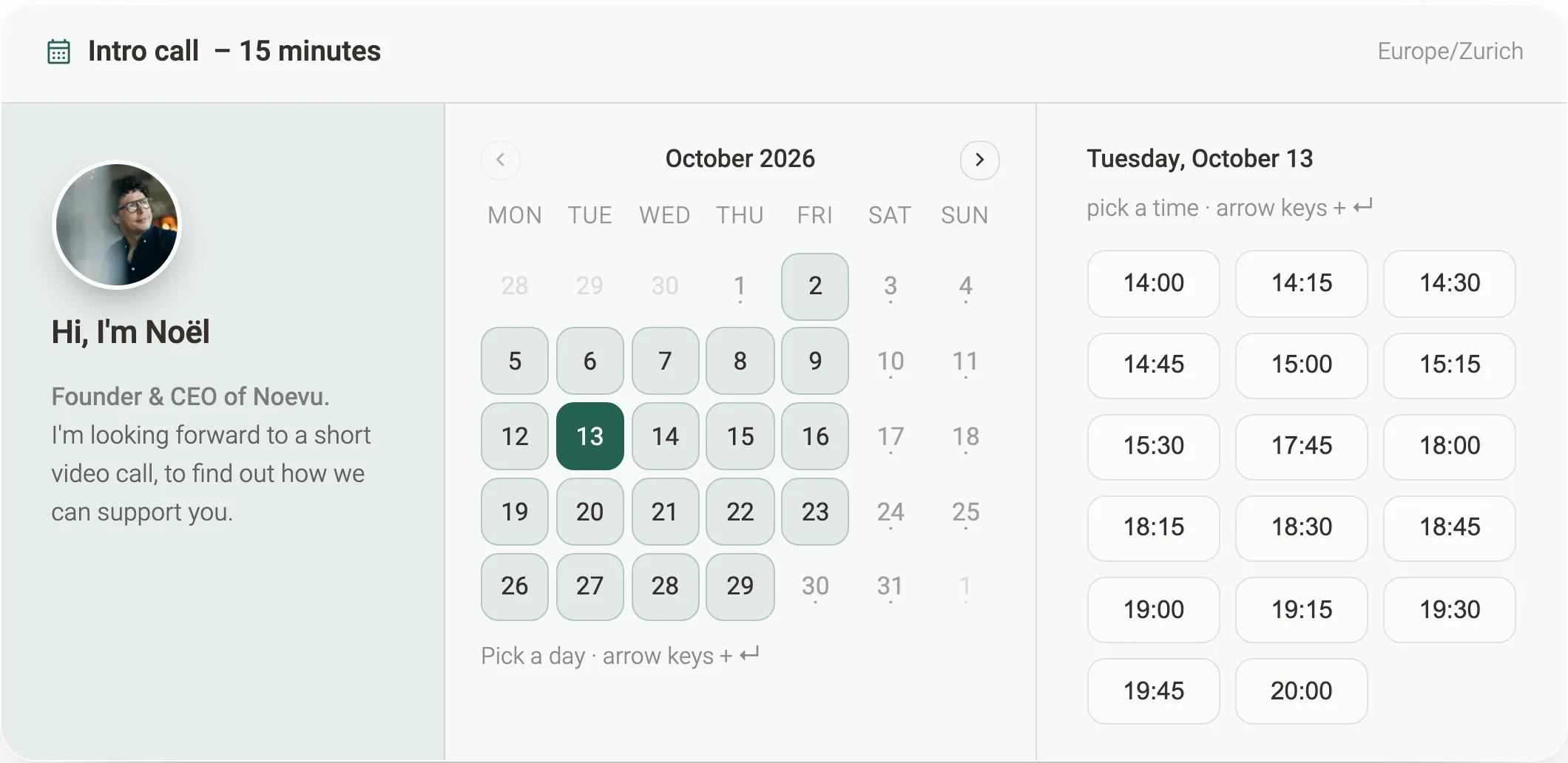
The appointment page for an intro call on noevu.ch shows free times in a calendar that looks like the rest of the website. In the background, Cal.com supplies the availability (referral link). Whoever books stays on the page and sees the confirmation immediately. If the link comes from an email, name and email address are already in the form.
The website's own server assembles the booking, field by field. That way nobody can book past buffer times or the daily limit through the form. A check in the background keeps automated requests out, without picture puzzles for humans.
Cal.com suits this approach because its interface provides free times, bookings, rescheduling and cancellations for custom front ends. Cal.com is a US company and processes the data in the US. For data from Switzerland, its privacy policy names standard contractual clauses or an agreement such as the EU-US Data Privacy Framework. It does not mention a certification under the Swiss-U.S. Data Privacy Framework. It offers data storage in the EU only from 50 users. Which basis applies to your account, you clarify before the first booking.
Data protection: what the revDSG requires for online appointments
Every booking contains personal data, and with the booking system another company processes that data. The revised Swiss Data Protection Act (revDSG) has applied since 1 September 2023. For online appointments that means four things.
- Duty to inform: The privacy policy names the booking system, the purpose and the countries the data goes to.
- Processing on your behalf: The provider processes the data on your behalf. That requires a data processing agreement, and before the first booking comes in.
- Data location: If the data is in the EU, the level of protection counts as adequate. In the US that only applies to companies certified under the Swiss-U.S. Data Privacy Framework. All others need additional safeguards, usually standard contractual clauses.
- Few fields: Ask only for what you need for the appointment. Every additional field is another piece of personal data you have to protect.
Even booking with a psychotherapist or a physiotherapist reveals something about health. Under the revDSG, health data counts as particularly sensitive. So don't ask for the reason for the visit in free text, and clarify data location and contract before going live. If in doubt, this question belongs with a data protection specialist.
Which appointments can be booked online
Best suited are appointments with a fixed duration and a clear purpose: the intro call, the consultation, the follow-up, the standard treatment. Both sides know beforehand what to expect.
In the trades, the appointment is often a site visit whose duration depends on the job. There, two or three questions before booking help: address, type of work, urgency. Depending on the answer, the form leads to the right appointment type or to a callback request. Appointments that can only be planned after some clarification stay with the phone.
So the phone doesn't disappear. Online booking is a second route for everyone who decides outside office hours or prefers clicking to calling.
Setting up online appointment booking: five steps
- Define appointment types: Which appointments are there, how long do they last, on site or by video, and who runs them?
- Define rules: Buffer time, minimum notice, daily limit, booking window and the questions before booking.
- Connect calendars: Connect every calendar that holds bookings, the private one too, and cross-check the times shown for a week.
- Clarify data protection: Sign the contract with the provider, extend the privacy policy, cut the fields down to what is necessary.
- Install and measure: Widget or custom calendar, plus the booking as a goal in your analytics. Finally, book a test appointment yourself.

The booking link belongs everywhere that "get in touch" stands today: in the email signature, in quotes and in the Google Business Profile. In emails to known contacts we attach name and email address to the link. Whoever clicks only has to pick the time.
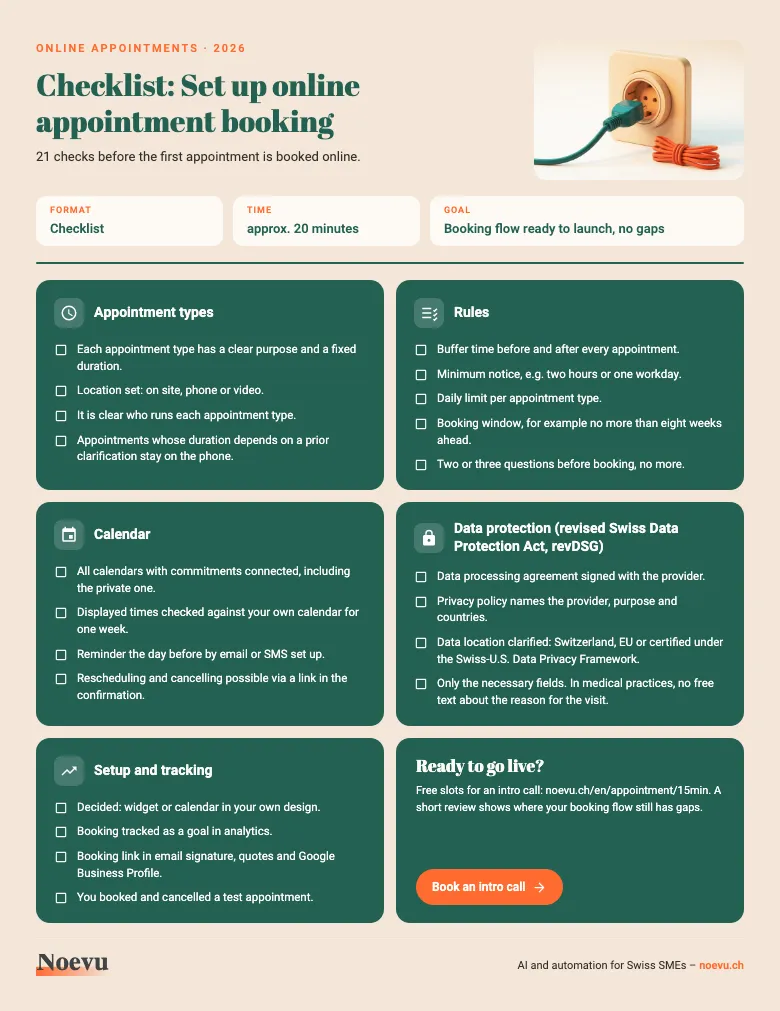
All five steps are available as a checklist to tick off, with the checkpoints for rules, calendar and data protection.
Checklist: Set up online appointment booking
The checklist leads you across one page with 21 checkpoints from the appointment type to the first test appointment. Tick them off before your booking goes live.
Thank you. Your download will start shortly.
Conclusion: online appointments as a second route next to the phone
Online appointments shorten the way from inquiry to a fixed appointment to a single step. That takes rules that reflect your day. Before the first booking, a contract and a clarified data location are added. For appointments on the side, a widget is often enough. Where booking should bring new customers and you have access to the code, a calendar in your own design pays off. The phone stays alongside.

An intro call shows which appointments can be booked online with you and how the calendar fits your design.
Frequently Asked Questions
Do online appointments need a new website?
No. A widget can be inserted into almost any website, including Squarespace, Wix or WordPress. A calendar in your own design needs access to the website's code. For websites with their own code, we build it in directly as part of a website optimization. For site builders, the widget is usually the pragmatic route.
Which booking system fits: Cal.com or Calendly?
Both cover appointment types, buffer times, reminders and the connection to Google or Microsoft calendars. A calendar in your own design needs an interface through which you query free times and create bookings. Both offer one, Calendly only on a paid plan. On noevu.ch the booking calendar runs on Cal.com. Both providers are US companies, so clarify the data location up front.
Do reminders really reduce no-shows?
For doctor and clinic appointments, yes. In a Cochrane review, 67.8 percent of people showed up without a reminder and 78.6 percent with an SMS reminder. The authors rate the quality of the evidence as moderate. Whether the effect is equally large for consulting appointments is not shown by these studies. How much a reminder brings with your customers shows in a test over a few weeks.
Can medical and therapy practices offer online appointments?
Yes, but with more care. Even an appointment can reveal health data, and under the revDSG that counts as particularly sensitive. So ask only for the necessary fields and skip free text about the reason for the visit. A contract with the provider and a data location with adequate protection come on top. Professional secrecy applies in addition; if in doubt, a data protection specialist clarifies it.
Will we lose customers who prefer to call?
No, as long as the phone stays. Online booking is added and helps above all those who decide in the evening or at the weekend, when nobody picks up.
How do we know whether online booking pays off?
Record every booking as a goal in your analytics and compare the number of first conversations before and after installation. With a calendar in your own design you also see at which step visitors drop off: day, time or form. On noevu.ch we measure exactly these three steps.
Sources
- The Short Life of Online Sales LeadsHarvard Business Review
- Mobile phone messaging reminders for attendance at healthcare appointmentsCochrane Database of Systematic Reviews
- Best practices for using third-party embedsweb.dev (Google)
- Federal Act on Data Protection (FADP), SR 235.1 (English version)Fedlex, Swiss Federal Chancellery
- New Swiss-U.S. Data Privacy FrameworkFDPIC
- Privacy PolicyCal.com
- Cal.eu: Cal.com hosted in EuropeCal.com
- Schedule Events with AI Agents (Scheduling API)Calendly