
What happens to rankings during a website relaunch?
Google knows your website by its addresses. Every page that brings visitors today has one. If that address changes in the relaunch, Google has to find the page again and classify it anew.
That takes time. Google writes that rankings can fluctuate after any major change to a website while Google crawls the pages again. For mid-sized websites, it can take several weeks or longer until Google shows the new addresses instead of the old ones, and longer still for larger ones. Over time, the rankings settle.
So fluctuations are to be expected. What you can influence is how clearly you show Google the path from the old address to the new one. That is what this article is about: inventory, mapping, test, launch day and monitoring.
A redirect automatically sends visitors and Google from an old address to a new one. A permanent redirect shows both that the page has moved. Without a redirect, anyone who opens the old address lands on an error page as soon as the page no longer exists there.
The graphic shows the same old address with and without a redirect.
Before launch: Which addresses does your website have today?
An inventory comes before the first draft. For the redirects in a website relaunch, you need a list of all old addresses. Google names four places to find them:
- the sitemap of your website, the page list for search engines
- Analytics, the visitor statistics, or the server logs for the most visited addresses
- the links to your website that Search Console shows
- the page list in your content management system
Images, videos, PDFs and downloads have addresses too and belong on the list. Which pages matter most for visibility is something you already clarify in the design briefing.
Two more things belong before launch. The website should be verified in Search Console, each time with all variants: with and without www, with http and with https. If the domain changes, this applies to the old and the new domain. The chosen verification method must also keep working on the new website.
Timing deserves thought too. If possible, Google advises moving during a period with fewer visitors. It makes sense to change only one thing at a time, for example the domain first, then the design. A relaunch usually changes plenty anyway, so it is worth not switching the domain as well.
How do you match old addresses to new ones?
Now every old address gets a target or a deliberate no. Google advises mapping the addresses of the old website to those of the new one, page by page. A simple redirect list is enough for this: old address, new address and a status. Status 301 stands for a permanent redirect, 410 for a page that is dropped.
| Old address | New address | Status | |
|---|---|---|---|
| Page moved | /services/webdesign.html | /webdesign | 301 |
| Page renamed | /team/all-employees | /team | 301 |
| Pages merged | /products/model-a and /products/model-b | /products | 301 |
| Page dropped | /news/2019/summer-sale | none | 410 |
Example with invented addresses. In the template below, every old address gets its own row, plus the columns Match and Note.
Three rules help with the mapping:
- One matching target per page. Sending many old addresses to a single unsuitable target such as the homepage can confuse visitors and can be treated as a “soft 404”, meaning like a page that was not found. Merged content may point to its shared new page.
- A deliberate no where there is no successor. Pages that are dropped return “not found” (404) or “gone” (410). In the list, status 410 is enough.
- No detours. If A leads to B and B to C, A is better off redirecting straight to C. Google follows up to ten redirects in a row but advises going straight to the target.

For a website with many pages, the list does not have to be built by hand. An AI assistant such as Claude can prepare it from the sitemaps. All old addresses are already in the sitemap.xml of the old website, for many at yourdomain.com/sitemap.xml. The addresses of the new website are in its sitemap or in the page list of the content management system. If the new website is not online yet, the agency supplies them.
For this, the content of both lists goes into the two fields of the prompt, the prompt is copied into the assistant and the answer is transferred to the Excel template below. For every row, the assistant states how certain the match is (“exact” or “approximate”). The suggestions should still be reviewed, especially the uncertain ones.
The two fields take the content of the two sitemaps. The button copies the prompt with the inserted text.
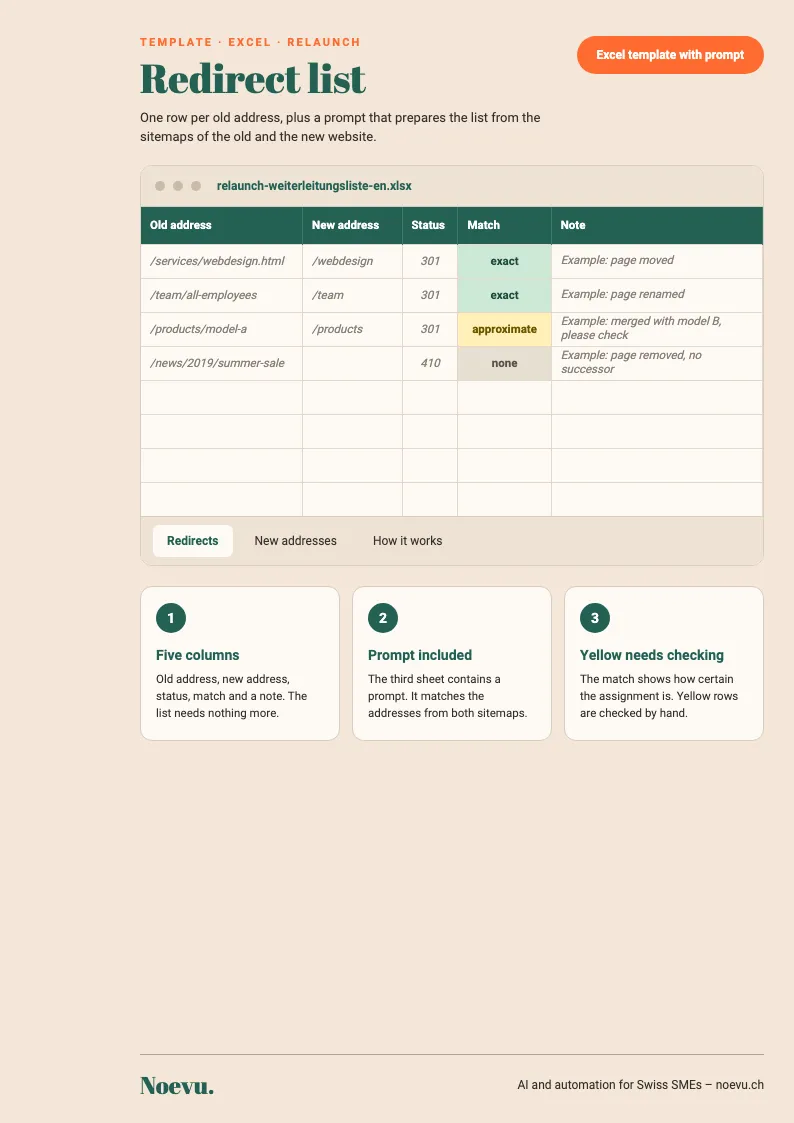
Excel template with prompt: Redirect list for your relaunch
The template has five columns: old address, new address, status, match and note. The answer of the AI assistant is transferred to the sheet “Redirects”. The “Match” column colours itself: “exact” green, “approximate” yellow. The prompt appears once more on the third sheet.
Thank you. Your download will start shortly.
Which kind of redirect is the right one?
For a relaunch with new addresses, permanent redirects are the right choice, meaning status code 301 or 308. The server sends the code along, and it decides what Google makes of it:
| Status code 301 and 308 | Status code 302, 303 and 307 | |
|---|---|---|
| Meaning | Moved permanently | Only temporary |
| What Google makes of it | Search shows the new address from then on | Search usually keeps showing the old address |
| For a relaunch | Right | Not suitable |
Google recommends setting them up on the server, where they have the highest chance of being understood correctly. They can be set up with your hosting provider, with the person who maintains the server, or via the redirect function of your content management system. A redirect via JavaScript is only a last resort.
How do you test the new website before Google sees it?
Until launch day, the new website usually sits at a test address. To keep it out of search too early, Google names access restricted to certain IP addresses and the “noindex” rule as examples. With “noindex”, Google leaves a page out of search. What matters here is the robots.txt, the file in which a website tells search engines which areas not to crawl: “noindex” only works if the page is not blocked there as well. Otherwise Google never sees the rule, and the page can still appear in search, for instance when other pages link to it.
At launch, these blocks must come off, along with a robots.txt that excludes everything, if one was set. Google counts forgotten blocks among the common mistakes in site moves; they can keep the new website from being fully included in search. So it is worth preparing the robots.txt for launch and the list of pages with “noindex” in advance.
On the test address, a few more things are checked:
- Each page names its future address as the authoritative one with a “canonical” tag.
- On multilingual websites, the language tags (“hreflang”) point to the new addresses.
- Internal links lead straight to new addresses and not via a redirect first.
- For the time after launch: no firewall or overload protection blocks Googlebot, the program Google uses to crawl websites. Google points this out for hosting changes.
What happens on launch day?
On launch day, these points are due, following Google's guide for moves with new addresses:
- Redirects from the redirect list switched on at the server
- Test-phase blocks removed: the access restriction, “noindex” and a robots.txt that excludes everything
- Redirects checked, one at a time in the URL Inspection tool of Search Console, many at once by script
- New sitemap submitted in Search Console
- Internal links, links in profiles and the targets of running ads pointed to the new addresses
It is also worth trying to contact the operators of websites that link to you, starting with those whose link brings the most visitors. Google recommends that small and mid-sized websites move all addresses at the same time. For large ones, moving in sections is possible.
The “Change of Address” tool in Search Console is only needed if the domain or subdomain changes. For a switch from http to https or from www to no www, it is not necessary, according to Google. The same goes for new paths within the same domain.
What do you monitor after launch?
Several weeks are to be expected, longer for larger websites. These places show whether the move is working:
- Indexing in Search Console: The indexed pages of the old website go down, those of the new one go up. Error spikes show up here too.
- Sitemaps in Search Console: The new sitemap should be submitted. The old one can be removed or left submitted for a while for observation; Google mentions both. For the old one, the number of indexed pages falls, for the new one it rises. Warnings about redirects in the old sitemap are normal.
- Search queries in Search Console: Impressions and clicks of the new addresses appear here.
- Analytics and server logs: Traffic to the old addresses falls, traffic to the new ones rises.
If Search Console shows many “not found” reports, the redirect list deserves a look. A redirect may point to an address that does not exist, or a redirect may be missing. Reports about deliberately dropped addresses (404 or 410) are to be expected. If the domain changes, old addresses can also still appear in search from time to time. That counts as normal.
After the move, Google temporarily crawls the new website more heavily than usual. For very large websites, the hosting provider is informed before launch so that the server can handle the extra requests.
Redirects should stay in place as long as possible, usually for at least a year. That lets Google transfer all signals to the new address, including the links other websites have to yours. For visitors, it can make sense to keep them indefinitely.
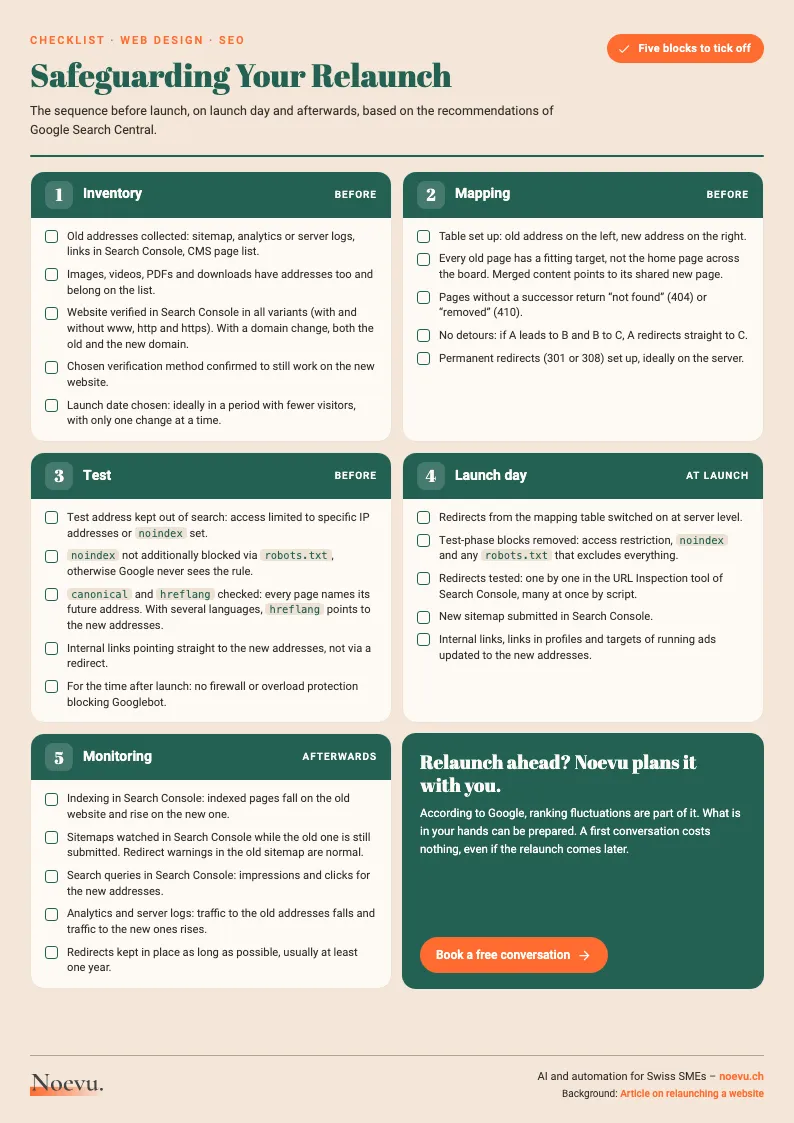
Checklist “Safeguarding Your Relaunch”: five blocks to tick off
The checklist condenses the process of the article onto one page: inventory, mapping, test, launch day and monitoring, each with points to tick off.
Thank you. Your download will start shortly.
Conclusion
A relaunch without a drop in Google cannot be guaranteed. What can be prepared is what you influence: a complete list of addresses and, for each, a target or a deliberate no. Then come a test phase with blocks and a launch day on which those blocks come off. Afterwards you observe the move and give Google time.
More on visibility in Google is on the search engine optimization page.

A first conversation costs nothing. Even if the relaunch comes later.
Frequently Asked Questions
How long does it take until Google shows the new addresses after a relaunch?
For small to mid-sized websites, it can take several weeks, according to Google, until most pages have moved, and longer for larger websites. During this time, visibility can fluctuate. According to Google this is normal, and rankings settle over time.
How long do redirects have to stay in place?
Google recommends keeping redirects in place as long as possible, usually for at least a year. That lets Google transfer all signals to the new address, including links from other websites. For visitors, it can make sense to keep redirects indefinitely.
Is it enough to redirect all old addresses to the homepage?
No. Google advises against sending many old addresses to a single unsuitable target such as the homepage. That can confuse visitors and can be treated as a “soft 404”, meaning like a page that was not found. It is better for each old address with a successor to lead to the matching new page. Where there is none, the server reports “not found” (404) or “gone” (410). Merged content may point to its shared new page.
What is the difference between a 301 and a 302 redirect?
301 and 308 are permanent redirects: the page has moved, and search shows the new address from then on. 302, 303 and 307 are only temporary: search usually keeps showing the old address. For a relaunch with new addresses, Google recommends the permanent variants.
Do I need the “Change of Address” tool for a relaunch?
Only if the domain or subdomain changes. For a switch from http to https or from www to no www, it is not needed, according to Google. The same goes for new paths within the same domain. For a domain change, the change is submitted for all verified variants of the old domain.
What do I have to set up in Search Console before the relaunch?
The website should be verified in Search Console, each time with all variants: with and without www, and with http and https. For a domain change, this applies to the old and the new domain. The chosen verification method must also keep working on the new website.
How do I keep Google from picking up the test version of the new website?
Google names access restricted to certain IP addresses and the “noindex” rule as examples. At launch, these blocks must come off, as must a robots.txt that excludes everything.
Sources
- Site Moves and MigrationsGoogle Search Central
- Redirects and Google SearchGoogle Search Central
- Changing Your Web Hosting and SEOGoogle Search Central
- Block Search Indexing with noindexGoogle Search Central