


What is WordPress — briefly explained
WordPress is a content management system — CMS for short. With it, you create and manage website content without writing code yourself. Around 43% of all websites worldwide run on WordPress: from small business sites and blogs to major media platforms.
The software itself is open source and free. What costs money is hosting, a professional design template, and the development work for setup and customisation. Then there are plugins (optional extensions for additional functions) and ongoing maintenance.
Two variants are worth distinguishing: WordPress.org is the self-hosted version. You download the software, purchase a hosting package, and have full control over design, plugins, and data. WordPress.com is a hosted service by the company Automattic: easier to set up, but with restrictions on the free plan. Agencies and professional websites generally rely on WordPress.org, and that is the version this article covers.
When does WordPress make sense?
WordPress fits when you need a lot of flexibility and have the technical know-how in-house or a reliable agency. The system works particularly well for websites that are meant to grow and change over the years.
Typical situations where WordPress is a good fit:
When is WordPress the wrong choice?
Just as important is the counter-question. WordPress is powerful, but that power comes at a price: time, maintenance effort, and security risks. For many SMEs, these costs are higher than expected and only become visible months after launch.
Typical situations where WordPress doesn't fit:
- You want to set up WordPress and handle the technical side yourselves, without prior knowledge
- There is no budget or agency for regular updates and security checks
- You are looking for a fast, low-maintenance online presence without major upfront effort
- A shop with TWINT is planned, but there is no budget for connecting it through a payment provider such as Datatrans
What to clarify before deciding
Before you start, a few honest questions are worth asking. The answers usually show quickly whether WordPress is the right platform or whether another system would be simpler and more durable.
- Who will set up the website and maintain it long-term: in-house or an agency?
- How often and to what extent will your content change: daily, weekly, or rarely?
- What specific features do you need, and which of those are only available as a plugin?
- How much budget is available per year for hosting, plugins, and maintenance?
- How important is maximum design freedom, or is a high-quality template sufficient?
- Are you planning an online shop, and if so, do you need TWINT?

What WordPress really costs
The software itself is free. The total cost of a professional WordPress presence is not. It is made up of several items, and many people underestimate the ongoing costs in years two and three most of all.
The following overview shows typical cost ranges for three common scenarios (prices in CHF, April 2026):
| Basic website | Standard SME | E-commerce | |
|---|---|---|---|
| Setup (one-time) | ~CHF 1,500–3,000 | ~CHF 3,000–8,000 | ~CHF 5,000–15,000 |
| Hosting (per year) | ~CHF 100–200 | ~CHF 200–600 | ~CHF 600–1,500 |
| Plugins (per year) | ~CHF 0–100 | ~CHF 150–400 | ~CHF 400–1,200 |
| Maintenance (per year) | ~CHF 300–600 | ~CHF 600–1,500 | ~CHF 1,200–3,000 |
| Total year 1 | ~CHF 1,900–3,900 | ~CHF 3,950–10,500 | ~CHF 7,200–20,700 |
| Ongoing from year 2 (per year) | ~CHF 400–900 | ~CHF 950–2,500 | ~CHF 2,200–5,700 |
| Ideal for | Blog or info site with a steady flow of new content | Service providers, SMEs with agency | Online shop, WooCommerce |
Hosting prices excluding VAT (8.1%). Maintenance costs depend on the scope of the agency services agreed.
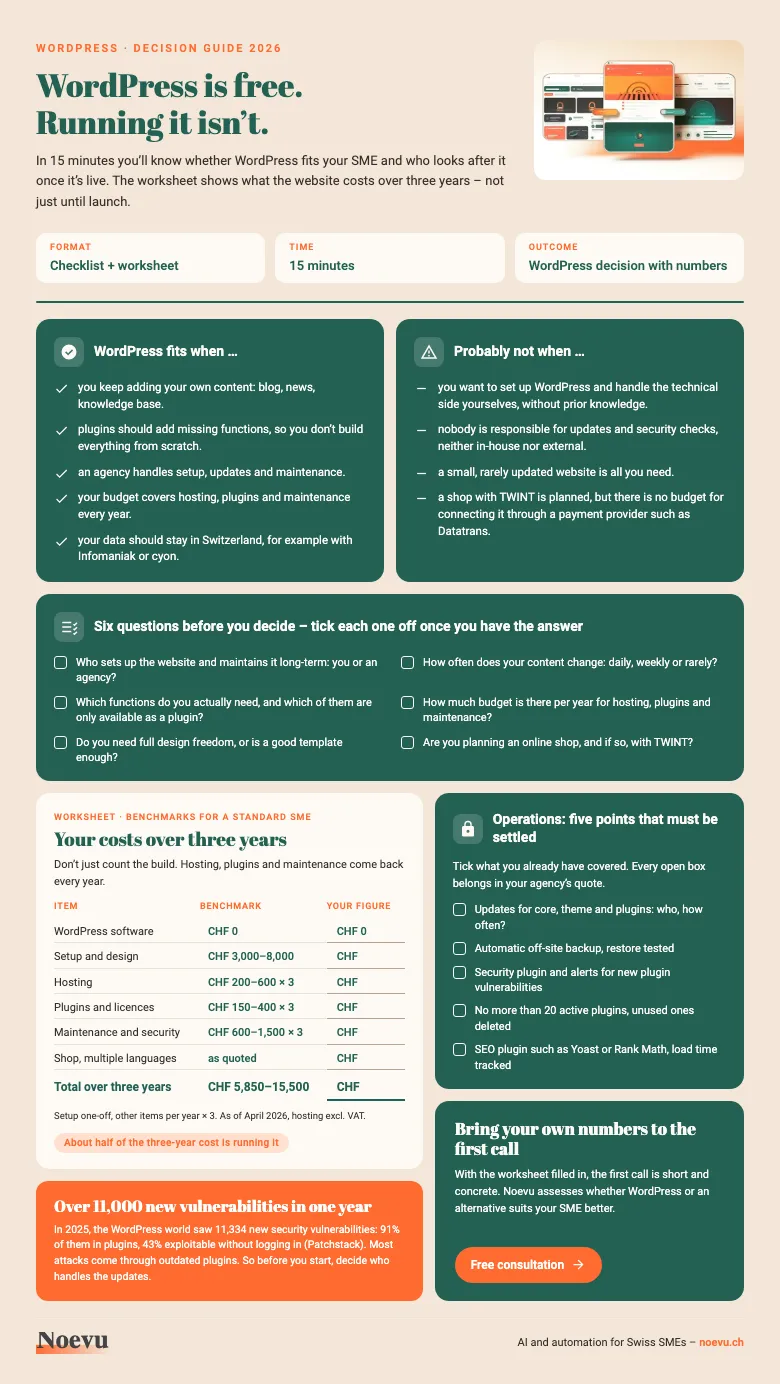
WordPress check with worksheet: your costs over three years
The checklist as a PDF: in 15 minutes you'll know whether WordPress fits your SME and who looks after it once it's live. It also includes a worksheet for your costs over three years and five points that must be settled for day-to-day operation.
Thank you. Your download starts in a moment.
Plugins and flexibility — what WordPress can do
WordPress has one of the largest plugin libraries of any CMS: over 60,000 free and paid extensions. There is a plugin for almost every function: contact form, online shop, booking system, membership area, newsletter integration.
That is a genuine strength. Instead of building a function from scratch, you install and configure a plugin. This saves time and money, as long as standard plugins cover your requirements. Three plugins are common on SME websites: WooCommerce for a WordPress shop, WPML for multilingual WordPress websites and WordPress page builders like Elementor or Divi.
The downside: plugins need regular updates, because every outdated plugin is a potential security risk. Many websites accumulate dozens of plugins over the years. Some of them keep running long after anyone stopped using them. This slows the site down and increases the attack surface. Then there are AI features such as automated copy suggestions (Jetpack AI) or AI image editing. Their quality varies widely, and they often only work on paid plans.
What WordPress really means for SEO
WordPress is considered SEO-friendly, and that is true, with one important caveat. The platform comes with solid technical foundations: clean URLs and encrypted connections via SSL. Since version 5.5, WordPress generates a sitemap for Google automatically. You manage titles and descriptions for search results with an SEO plugin like Yoast SEO or Rank Math, which also provides structured data.
What WordPress does not handle on its own: image compression, load times, and page speed as measured by Google (Core Web Vitals). That takes caching, image optimisation, and development work. How good the result is depends on how consistently someone implements it.
For Swiss SMEs, the key point is: WordPress SEO only pays off when someone actively works on it. Anyone running a WordPress site without SEO work gets little out of the technical foundation.
Which alternatives exist — and when do they fit better?
The best CMS is the one that fits your situation. WordPress is the right choice in many cases. For others, there are platforms with less maintenance effort, lower ongoing costs, or simpler handling.
The article Best WordPress Alternative for Swiss SMEs assesses all relevant alternatives, with recommendations for each situation. Anyone planning a new website will find an overview of different approaches on the create a website page. A structured CMS comparison for Switzerland is available in the CMS check for Swiss SMEs.
The most common alternatives at a glance:
| Good fit for | Keep in mind | |
|---|---|---|
| Squarespace | SMEs without their own development team: low-maintenance, everything from one provider | No native TWINT |
| Shopify | Online shops that need TWINT and plan to grow | Servers in the US and Canada, plans from USD 39 per month |
| Wix | Quick start, AI-powered, native TWINT | Switching later is a lot of work: content and design have to be transferred from scratch |
| Headless CMS (Strapi, Payload) | CMS kept separate from the website: full flexibility, your team manages the content itself | Setup needs developers or an agency |
| Custom build (Astro) | Top speed and full control | More effort for the initial build |
Conclusion
WordPress is not a quality mark — it is a tool. Used well, with a clear strategy, reliable hosting, and ongoing maintenance, it is a strong system for websites, blogs, and shops.
Without a maintenance plan, it creates more work than expected over time. Security gaps from outdated plugins, performance issues, and rising development costs are typical consequences.
Whether WordPress fits depends on your situation. Three questions settle it: Who is responsible for ongoing maintenance? Which features do you really need? What budget is available long-term? Answer them honestly and you'll make a well-founded choice, whether it lands on WordPress or not.

Whether WordPress is the right choice depends on your specific situation. A short conversation can clarify which approach fits your requirements, budget, and goals.
Frequently Asked Questions
What exactly is WordPress?
WordPress is a content management system (CMS), meaning software you use to create and manage websites without writing code. The software is open source and free to use. Costs arise from hosting, design, plugins, and development work. WordPress powers approximately 43% of all websites worldwide.
What does a WordPress website cost for a Swiss SME?
Costs vary considerably. A simple basic website costs around CHF 1,500–3,000 one-off for setup and design. Add CHF 400–900 per year for hosting, plugins, and maintenance. A typical SME website runs CHF 3,000–8,000 one-off and CHF 950–2,500 per year to keep it running. All prices in CHF (April 2026).
Is WordPress secure?
WordPress core software is solid. The problem lies mainly with plugins: of 11,334 new vulnerabilities in 2025, 91% affected plugins (Patchstack). In 43% of cases, they could be exploited without logging in. Most attacks come through outdated or poorly maintained plugins. Anyone running WordPress needs a clear plan for regular updates and security monitoring — or an agency to handle it.
What is the difference between WordPress.com and WordPress.org?
WordPress.org is the self-hosted open-source version: you download the software, choose your own hosting, and have full control over design, plugins, and data. WordPress.com is a hosted service by the company Automattic: easier to set up, with limited functionality on the free plan and subscriptions for additional features.
Do I need an agency to run WordPress?
For initial setup, technical expertise or an agency is usually necessary. After that, you manage day-to-day content such as texts, images, and blog posts yourselves. For updates, security checks, and technical adjustments, ongoing agency support is recommended. Without this, security risks and performance issues build up over time.