

What is WPML — a brief explanation
WPML stands for WordPress Multilingual Plugin and has been the most widely used plugin for multilingual WordPress websites for over 15 years. More than 1.5 million active installations worldwide — a figure that shows just how established the tool has become.
At its core, WPML does the following: it allows you to create each page, post, and menu item in multiple languages. Visitors see the website in their language, and each language version has its own URL — important for both SEO and user navigation.
For your SME, this means concretely: you don't need to run two separate websites to offer German and French. Everything runs through a single WordPress installation. That sounds more efficient than it often is — more on that shortly.
When does WPML make sense?
WPML delivers value where multilingualism goes truly deep — not just the homepage or a handful of subpages, but when content needs to be regularly maintained, updated, and managed across multiple languages.
When is WPML the wrong choice?
Demand for WPML is high — but not every SME needs the full complexity of the plugin. In many projects, WPML ends up being used when a lighter-weight solution would have achieved the same goal with less maintenance overhead.
What you need to clarify before deciding
Before committing to WPML (or an alternative), it's worth honestly answering a few fundamental questions. This checklist helps you assess your own situation — independently of what your developer or an agency recommends.

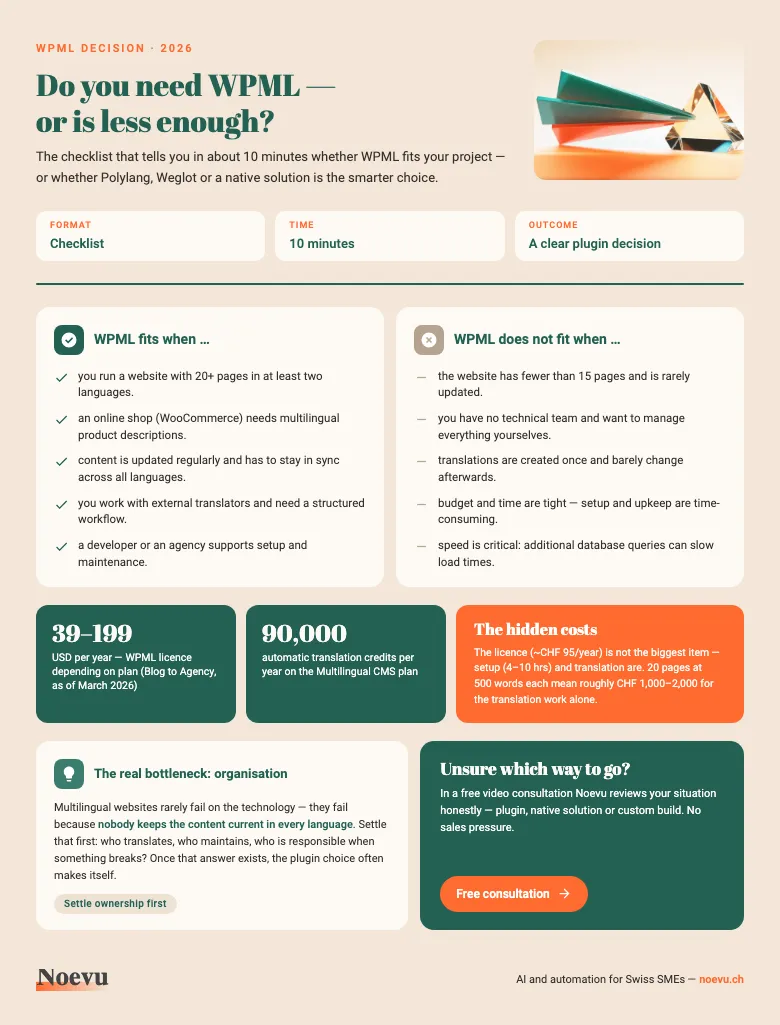
WPML decision checklist: do you really need WPML?
The checklist as a PDF. In about 10 minutes you can tell whether WPML fits your project — including the hidden costs and the question of who keeps the content current in every language.
Thank you. Your download starts in a moment.
WPML, Polylang or Weglot?
The market for multilingual WordPress solutions is manageable: three approaches dominate, and all have their place. The choice depends less on feature lists than on your situation — team size, budget, maintenance effort, and technical support.
There is no objectively best plugin — only what fits or doesn't fit your project.
| WPML | Polylang | Weglot | |
|---|---|---|---|
| Price | ~CHF 38–192/year | Free / ~CHF 96/year | ~CHF 15–75/month |
| Setup effort | High | Medium | Low |
| Automatic translation | Yes (DeepL/Google) | No (paid add-on) | Yes (cloud-based) |
| WooCommerce support | Full | Limited | Limited |
| SEO control | Full | Full | Limited |
| Best for | Complex projects, shops | Simple SME websites | Quick automation |
Prices converted to CHF (March 2026).
Weglot is a special case: it's not a traditional WordPress plugin but a cloud-based solution that stores and translates content externally. This makes setup simple — but vendor dependency and monthly costs can become relevant quickly as your website grows. If you cancel Weglot at some point, you lose all stored translations.
What WPML really means for SEO
Multilingual websites and SEO are technically demanding — regardless of which plugin you use. WPML gives you the tools for a clean SEO structure, but it doesn't automatically configure them correctly. The responsibility lies in the setup.
The most important element is the hreflang attribute: it signals to Google which language version of a page is intended for which region. If it's missing, misconfigured, or inconsistently applied, Google interprets language versions as duplicate content — with negative consequences for the ranking of all versions.
WPML generates hreflang tags automatically, as long as language versions of pages are correctly linked. This works reliably, provided all pages are fully translated and the connections between language versions are maintained. A half-translated website with missing links generates incorrect hreflang tags that are difficult to debug.
Those using an SEO plugin like Yoast or RankMath alongside WPML need to verify both systems are sending the same signals. Conflicts between WPML-generated and SEO plugin-generated hreflang tags or canonicals are a common source of indexing problems — and are often underestimated by agencies. More on this in the CMS check for Swiss SMEs.
What WPML really costs
The licence fee is the most visible but rarely the largest cost factor with WPML. Anyone planning a multilingual website should keep the full picture in mind.
The licence costs approximately CHF 38 to CHF 192 per year depending on plan — for most SME projects, the Multilingual CMS plan (~CHF 96/year) is sufficient. It includes 90,000 automatic translation credits, which covers a medium-sized website for the initial setup.
The larger effort comes from setup and ongoing maintenance: configuring WPML correctly — with clean URL structures, hreflang configuration, compatibility testing with existing plugins and page builders — requires experience and time. For a typical SME website, 4–10 hours of development time for the base configuration is realistic, depending on complexity.
On top come translation costs: professional translations range from approximately CHF 0.10–0.20 per word depending on language and text length. A 20-page website with 500 words per page means 10,000 words — roughly CHF 1,000–2,000 for translation alone, without setup and maintenance. Automatic translations are cheaper, but require proofreading.
Factoring this in realistically leads to better decisions — regardless of which plugin is ultimately chosen.
Multilingualism without a plugin: what are the alternatives?
Those who haven't yet committed to a platform have more flexibility than they realise. Whether WordPress is the right foundation for a multilingual website is a question worth asking before choosing a plugin.
Squarespace offers a native multilingual solution and a direct integration with Weglot — translations are managed in the cloud, without plugin dependencies or compatibility risks. For SMEs without an existing WordPress infrastructure, this is often the smoother path.
Webflow has had its own localisation features since 2023: separate URL paths, hreflang tags, and translatable components — all without external plugin dependencies.
Custom-built websites on modern platforms like Astro treat multilingualism as an architectural requirement — each language is a dedicated content path, planned from day one. No plugins, no compatibility issues, no hidden complexity during updates. More on this in the WordPress alternatives article.
This doesn't mean WPML is the wrong choice. For existing WordPress websites with high translation workloads and technical support in place, it remains a proven solution. But those who can still choose their platform freely should treat multilingualism as an architecture question — not a plugin question.
Conclusion
WPML is not a universal tool — it's the right tool for complex, multilingual WordPress projects with ongoing translation needs, WooCommerce integration, or high SEO requirements. For smaller projects, Polylang is often sufficient, and for some SMEs, the fundamental question is worth asking: is WordPress the right starting point for multilingualism at all?
The key insight from practice: the technical decision for a plugin is the last thing to think about. First comes the organisational question — who translates, who maintains, who is responsible when problems arise. Once those questions are answered, the plugin choice usually follows naturally.
If you're still unsure after reading this, that's not a disadvantage. Noevu helps exactly in this situation — with an honest assessment, not a recommendation driven by the next project. Have a look at the WooCommerce article if a shop is part of your plans. Once multilingual upkeep becomes a permanent cost, tailor-made website development is usually the cheaper path.

Which approach fits best — plugin, native platform solution, or custom-built — can be clarified in a short conversation.
Frequently Asked Questions
Is WPML free?
No. WPML is a paid plugin. The cheapest plan (Multilingual Blog) costs approximately CHF 38/year and is limited to basic websites. The most commonly used plan (Multilingual CMS) costs approximately CHF 96/year and supports three live websites. Those who want multilingual WooCommerce need the Agency plan at approximately CHF 192/year. Polylang offers a free basic version as an alternative.
Can WPML translate automatically?
Yes, WPML offers automatic translations through integrations with DeepL and Google Translate. The Multilingual CMS plan includes 90,000 translation credits per year. For most SME websites, that's enough for the initial setup. Important: automatic translations should always be reviewed by native speakers — especially for marketing copy and legal content.
What's the difference between WPML and Polylang?
Both plugins enable multilingual WordPress websites but differ in scope and approach. WPML offers more features (automatic translation, WooCommerce support, extensive compatibility list) and is paid. Polylang has a free basic version, is lighter weight, and easier to set up. For small two-language websites, Polylang is often sufficient. For complex structures, WooCommerce, or many languages, WPML wins.
Is WPML GDPR-compliant?
WPML itself stores no personal data and is not problematic from a data privacy perspective. GDPR relevance arises through automatic translation services: content is transmitted to external servers from DeepL or Google. Those who want to avoid this translate manually — or use a service with EU hosting. Switzerland has its own nDSG (new Data Protection Act) which imposes similar requirements.
Can WPML be removed later?
Yes, but it's time-consuming. WPML stores translations in the WordPress database using its own table structures. When deactivated, this data remains but the site becomes monolingual. A clean migration to an alternative (e.g. Polylang or Multisite) typically requires a developer. This is an important reason to make the decision consciously from the start.