


What Is WooCommerce — a Quick Explanation
WooCommerce is a free plugin for WordPress that turns a regular website into an online shop. Released in 2011, it's now the most widely used e-commerce system in the world — with over 4.6 million active shops and a global market share of around 20 percent.
In practical terms: if you already run a WordPress website, you can install WooCommerce and have a functional shop within hours. Add products, set prices, accept payments — the basic features are immediately available.
The difference to platforms like Shopify: WooCommerce isn't a closed platform but an open-source toolkit. You host the shop yourself, choose your own plugins, and have full control — but also full responsibility.
When Does WooCommerce Make Sense?
WooCommerce works best in specific constellations. It's not the right solution for everyone — but for some SMEs, it's exactly the right fit.
WooCommerce makes sense when at least two of the following apply to you:
You already have a WordPress website. If your content, blog, and brand run on WordPress, WooCommerce is the most natural path to a shop. No platform switch, no double maintenance, everything under one roof.
You need specific customisations. A B2B pricing system with tiered prices, integration with Swiss accounting software like Bexio, a custom checkout process — thanks to thousands of plugins and an open codebase, WooCommerce can adapt to almost any requirement.
You have technical ownership. This doesn't mean you need to code yourself. But someone in your organisation or a supporting agency must take responsibility for updates, security, and hosting. When this role is clearly assigned, WooCommerce runs reliably.
A concrete example: a Zurich-based trades company with 12 employees has run their website on WordPress for years. Now they want to sell spare parts online — 80 products, simple variants, local pickup. WooCommerce is the logical choice here: no platform switch, manageable complexity, full integration with the existing site.
In practice, WooCommerce works best when it's not the main project — but a sensible extension of an existing WordPress presence. Once the shop becomes the core business, requirements quickly exceed what a plugin can comfortably deliver.
When Is WooCommerce the Wrong Choice?
Just as important as asking 'When WooCommerce?' is the opposite question. Many WooCommerce projects fail not because of the technology — but because of wrong expectations.
You want to run a shop without technical effort. WooCommerce requires regular updates of WordPress, the plugin itself, and all extensions. Ignoring this risks security vulnerabilities and compatibility issues. Shopify handles this for you — with WooCommerce, it's your responsibility.
You're starting from scratch without WordPress experience. If you don't have a website yet and want to launch directly with an online shop, the detour via WordPress plus WooCommerce plus hosting plus plugins is often disproportionate. Shopify or even Wix get you online in half the time.
Your shop is meant to be the primary revenue source. If e-commerce is your core business — with hundreds of products, complex fulfilment, and multichannel sales — WooCommerce hits its limits. Not technically, but operationally: it lacks the built-in tools for inventory management, shipping logistics, and customer support that specialised platforms offer.
Another example: a startup plans a pure online shop with 500 products, fulfilment service integration, and multichannel sales via Instagram and Amazon. WooCommerce would be technically possible — but operationally a heavy lift that would be far more efficient with Shopify or Shopware.
The biggest mistake with WooCommerce: 'It's free, so let's just try it.' Without clear responsibility for maintenance and updates, a security risk develops within months — and the cost of rescue exceeds the cost of a well-planned solution from the start.
WooCommerce vs. Shopify: The Honest Comparison
In practice, most SMEs face exactly this decision: WooCommerce or Shopify. Both have their place — but for very different situations. Instead of an endless feature list, here are the differences that truly matter in daily work.
| WooCommerce | Shopify | |
|---|---|---|
| Base cost | Plugin free, hosting from CHF 15/mo. | From CHF 36/mo. (Basic plan) |
| Real annual cost (SME) | CHF 4,000–8,000 incl. maintenance | CHF 1,500–4,000 incl. apps |
| TWINT | Via plugin (Saferpay, Datatrans) | Native since 2025 |
| Technical knowledge needed | Yes — updates, hosting, security | No — fully managed |
| Customisability | Unlimited (open source) | Limited (app ecosystem) |
| SEO control | Full control (Yoast, RankMath) | Good basics, less depth |
| Swiss hosting possible | Yes | No |
| Maintenance effort | High — self-managed | Minimal — platform handles it |
Prices rounded, as of March 2026. Shopify prices converted to CHF.
The table reveals a clear pattern: WooCommerce offers more control and flexibility — but at a higher price in terms of time, technical know-how, and ongoing responsibility. Shopify takes operational work off your hands but limits design possibilities.
For most Swiss SMEs running a manageable shop alongside their main business, Shopify is often the more pragmatic path. WooCommerce pays off when you're already deeply invested in WordPress or have specific requirements that Shopify can't fulfil.
What WooCommerce Really Costs
'WooCommerce is free' is technically correct — and practically misleading. The plugin itself costs nothing. But a functioning, secure, and legally compliant shop in Switzerland costs significantly more than most expect.
Here's a realistic breakdown for a Swiss SME with 50–200 products:
One-time costs
- Professional setup: CHF 3,000–12,000
- Theme / custom design: CHF 500–5,000
- Payment integration (TWINT, credit cards): CHF 500–1,500
- Legal compliance (nDSG, T&C, imprint): CHF 300–800
Ongoing costs per year
- Hosting (Switzerland): CHF 180–960/year
- Premium plugins (security, SEO, backup): CHF 200–600/year
- Maintenance and updates: CHF 1,200–4,800/year
- SSL certificate: often included with hosting
- Transaction fees: 1.5–2.9% depending on provider
All told, you're realistically looking at CHF 5,000–15,000 in the first year and CHF 2,000–6,000 per year afterwards. That's not expensive — but it's not free either. And it's important to know these figures before you decide.
For comparison: a Shopify shop with comparable functionality costs CHF 2,000–5,000 in the first year and CHF 1,500–3,000 per year afterwards — with significantly less management effort on your part.
WooCommerce in Switzerland: TWINT, nDSG, and Hosting
WooCommerce was built for the US market. That means Swiss requirements need to be retrofitted. It's doable — but it's a step you need to plan for.
TWINT integration: With over 6 million active users and 70 percent market share in Swiss online retail, TWINT isn't optional — it's essential. In WooCommerce, TWINT runs through payment providers like Saferpay (SIX), Datatrans, or PostFinance Checkout. You need a separate plugin and a contract with the payment provider. It works reliably, but it's not 'switch on and done' like with Shopify.
nDSG compliance: Switzerland's new Data Protection Act (nDSG, since September 2023) requires, among other things, a transparent privacy policy and consent management. WooCommerce doesn't include its own tools for this — you need plugins for cookie consent and data protection. Important: Switzerland doesn't require cookie banners like the EU, but your shop must still disclose what data is collected.
Swiss hosting: Unlike Shopify (servers in the USA and Canada), you can host WooCommerce with a Swiss provider — for example Infomaniak, nine.ch, or cyon. This is relevant for industries with heightened data protection needs (healthcare, finance, government) and can be a deciding factor.

If you're running WooCommerce in Switzerland, budget at least CHF 1,000–2,000 extra for TWINT and legal compliance. And choose a Swiss host — not for performance, but for support in your language and legal certainty regarding data storage.
What You Should Clarify Before Deciding
Before deciding for or against WooCommerce, you should honestly answer a few fundamental questions. Not the technical ones — those come later. The organisational ones that determine success or frustration.
Decision checklist
If you answer at least four of these questions with Yes, WooCommerce is a valid option. If three or more answers are No, you'll save yourself long-term stress and money with a managed platform like Shopify.
Another SME example: a Bern-based consulting firm with 8 employees wants to sell digital workshops through their website — 5 products, no physical shipping. The site runs on Squarespace. WooCommerce would be overengineering: Squarespace Commerce or Shopify covers this need at a fraction of the effort.
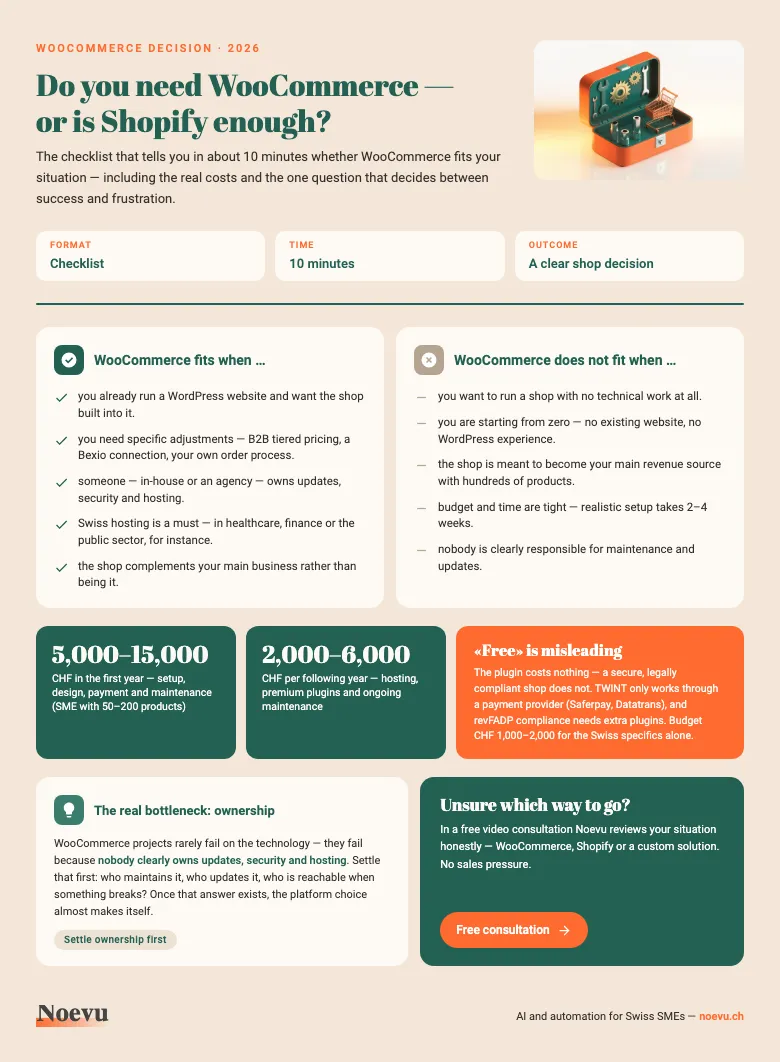
WooCommerce decision checklist: does it fit your SME?
The 10-point checklist as a PDF: in about 10 minutes you can tell whether WooCommerce fits your situation — including the real first-year costs and the one question that decides between success and frustration.
Thank you. Your download starts in a moment.
What to choose instead of WooCommerce?
Noevu does not use WooCommerce as a default solution — nor as an exception. It's a tool that's the right answer in certain situations.
In practice, Noevu recommends WooCommerce primarily when clients already have an established WordPress presence and the shop should be a natural extension of that site. In these cases, WooCommerce avoids a platform switch and keeps content and sales under one roof.
What Noevu will not do: recommend WooCommerce just because it's 'free' or 'open source'. If a client's requirements are better suited to Shopify — less maintenance, faster launch, native payment integration — that's the honest advice. There's no objectively best shop system — only appropriate or inappropriate.
For new shops without existing WordPress infrastructure, Shopify fits most cases. For more complex setups with specific integration requirements or headless architectures, WooCommerce as a backend solution can be very powerful. Such setups are built by an agency for headless CMS.
Conclusion
WooCommerce is a capable e-commerce system — but not a self-runner. It rewards SMEs that define clear technical responsibility and are willing to invest in maintenance and security. For everyone else, there are simpler paths to an online shop.
The decision for or against WooCommerce isn't technical — it's organisational. If you know who handles updates, how much budget you have for ongoing operations, and why Shopify doesn't meet your specific needs, then WooCommerce is a solid choice.
If you're unsure about these questions, that's not a problem — it's exactly the right moment to ask them. Before the decision is made, not after. If it goes against WooCommerce, the shop can be delivered as tailor-made website development.

Which system fits your situation — Shopify, WooCommerce, or a custom solution — can be clarified in a short conversation.
Frequently Asked Questions
How much does a WooCommerce shop cost for a Swiss SME?
WooCommerce itself is free. Real costs include hosting (CHF 15–80/month with Swiss providers), premium plugins (CHF 200–800/year for payment, security, legal compliance), professional setup (CHF 3,000–15,000 one-time), and ongoing maintenance (CHF 100–400/month). Expect CHF 4,000–8,000 in the first year for a solid shop.
Can I integrate TWINT with WooCommerce?
Yes, but not natively. You need a Swiss payment provider such as Saferpay (SIX), Datatrans, or PostFinance Checkout that supports TWINT as a payment method. Integration requires a separate plugin. With Shopify, TWINT has been natively integrated since 2025 — with WooCommerce, it remains an additional effort.
Is WooCommerce more secure than Shopify?
Not automatically. With Shopify, the platform handles security updates, SSL, and PCI compliance. With WooCommerce, that responsibility lies with you: WordPress core, plugins, and server need regular updates. WooCommerce can be secure — but only with active management or a maintenance contract.
Do I need a developer for WooCommerce?
For setup and customisation: usually yes. For daily management (products, orders, content): no. The WordPress interface is usable by non-technical staff. But whenever you need to update plugins, resolve conflicts, or make design changes, you'll need technical support.
Can I migrate from WooCommerce to Shopify later?
Yes, migration is possible. Products, customers, and order history can be transferred using tools like Cart2Cart or LitExtension. However, design, payment connections, and redirects need to be rebuilt. Expect 2–6 weeks of effort depending on shop size. The sooner you switch, the easier it will be.