

What is Sanity CMS — explained briefly
Sanity is a headless CMS — that means content management is separate from website display. You manage texts and images in an admin interface, and that content can appear across different channels: website, app, newsletter. The admin interface (called Sanity Studio) is fully customizable by developers to match your business needs. All content is stored in Sanity's cloud storage, called the Content Lake.
Since 2025, Sanity calls itself a "Content Operating System." That sounds like marketing, but it reflects reality: with features like Canvas (visual content planning), a media library, and a central dashboard, Sanity goes beyond pure content management.
For SMEs, this means: Sanity is a powerful tool — the setup requires technical know-how, the daily work afterwards does not. The flexibility is real, but it doesn't come for free.
What Sets Sanity Apart from Other Headless CMS Platforms
There are many headless CMS options these days. What sets Sanity apart from alternatives like Strapi, Contentful, or Payload are four core features that make a real difference in practice.
Sanity's Unique Features
Particularly valuable is that the content structure is defined in code, not clicked together in a web interface. This makes changes traceable and lets teams review updates before they go live — provided your team can work with code.
AI Features: What Sanity Automates with Content Agent
Since 2025, Sanity has been investing heavily in AI — not as a gimmick, but as a genuine productivity tool for editorial teams. The centrepiece is Content Agent: an AI assistant that works directly inside the admin interface and takes over tasks that previously took hours or days.
In practice, this means:
- Create and enrich content: Generate a finished article from a press release — including metadata, images and alt text
- Audit and clean up content: Scan hundreds of documents simultaneously for missing fields, outdated links or quality issues
- Bulk edits: Replace a brand name across 500 articles, update URLs or restructure categories
- Translate: Localise content into other languages — respecting glossaries and style guides
- Edit images: Adjust colours, change crops or generate brand-aligned images — via text instructions
Under the hood, this is powered by Agent Actions — an API layer that automatically validates AI-generated content against the content schema. This means the AI cannot populate fields incorrectly or break structures, because the system checks every suggestion before it is applied.
Sanity's AI features are new (from 2025) and still evolving. Language quality for German is not yet on par with English — for automated translations or text generation, native-language proofreading should be planned in. All AI-generated changes are proposed as drafts and must be approved manually.
When is Sanity the Right Choice?
Sanity is not the right tool for every situation. But there are clear scenarios where the platform really shines — and not just for large enterprises.
Sanity works particularly well when:
- The setup is handled professionally — either internally or through a Sanity CMS agency
- The same content appears across multiple channels — website, app, newsletter
- Content structure is complex — e.g., multi-language, modular, reusable
- Multiple editors work simultaneously and need live preview
- Design and content should be consciously separated
A typical scenario: a Swiss SME with 15 employees that wants to power a multi-language website, blog, and app with the same content. Here, Sanity creates real efficiency because content is managed once and published everywhere.
Sanity reveals its value only when content is thought of as structured data — for example, a product description that works on the website, app, and newsletter. SMEs that make this perspective shift benefit long-term. If you just need "a website," you're better off with a classical solution.
When is Sanity the Wrong Choice?
Just as important as asking about strengths is asking the hard questions. Many CMS projects fail not because of the technology, but because of mismatched expectations.
One distinction first, because it is almost always confused: this is about the setup, not the running. Once Sanity is properly configured, your team manages posts, pages and images on its own, without developers. The points below concern the road to that state.
Sanity is probably the wrong choice if:
- You want to set Sanity up and maintain it technically yourselves — the setup belongs in experienced hands
- The website is relatively simple (5–10 pages, rarely updated)
- There's no budget for website development
- You need maximum data sovereignty — Sanity is cloud-only, no self-hosting
- You want an off-the-shelf solution without agency support, combining hosting, design, and CMS out of the box
A common pattern: a craft business wants a modern website with a blog. Content changes rarely, the budget is tight. Here, Squarespace, WordPress, or a simpler CMS would be the smarter choice — not because Sanity is too hard to use, but because the setup does not pay off at that scale.
Sanity is often chosen because it sounds "modern." But modern technology without the right organization creates more friction, not less. The most common mistake: implementing Sanity without having the setup professionally guided. Skip that step and you end up with an interface nobody enjoys using.
Sanity Compared: Strapi, Contentful & Payload
When evaluating Sanity, you usually also have Strapi, Contentful, or Payload on your radar. These four platforms follow different philosophies — and the right choice depends less on features than on your situation.
| Sanity | Strapi | Contentful | Payload | |
|---|---|---|---|---|
| Hosting | Cloud (EU) | Own server | Cloud (EU/US) | Own server |
| Source code open | Partially (interface: yes, storage: no) | Fully | No | Fully |
| Free plan | Yes (up to 20 users) | Yes (own server) | No (from $300/mo) | Yes (own server) |
| Data access | Custom language (GROQ) | Standard interfaces | Standard interfaces | Standard interfaces |
| Real-time Collaboration | Yes | No | No | No |
| Data Sovereignty | Limited | Full | Limited | Full |
| Learning curve | Steep (programming skills needed) | Moderate | Gentle | Steep (programming skills needed) |
| AI features | Content Agent (text, images, translations, audits) | No built-in AI features | AI Content (text generation, translations) | No built-in AI features |
| Best for | Multiple channels, design teams | Full control, budget-conscious | Enterprise, large teams | Developers, maximum control |
As of March 2026. Pricing and features may change.
The most important difference: Sanity and Contentful store your data in their cloud. Strapi and Payload are fully open source — you can run them on your own server and have full control. There is no objectively "best" system — only the right fit or the wrong one.
What Sanity Costs — and What's Often Overlooked
Sanity's pricing model is attractive at first glance: the free plan offers 20 users, 10,000 documents, and 500,000 data requests per month — enough for many small projects. The Growth plan starts at $15 per user per month and scales with usage.
But what the price lists don't mention:
- Website development: Sanity provides only content management — the website must be built separately. Initial costs: CHF 12,000–25,000 depending on scope.
- Content structure: Organizing content requires conceptual work and technical understanding. This is not a click-and-go setup.
- Software updates: Framework updates, security patches, hosting costs for your website — all this adds to Sanity costs.
- Provider dependency: Content lives in Sanity's cloud. Switching to another CMS requires complete data migration.

Don't calculate just the CMS license — factor in the whole package: development, hosting, maintenance, and agency support over 3 years. Only then does it become clear whether Sanity is cheaper or more expensive than alternatives. In many cases, a CMS on your own server like Payload is more cost-effective long-term.
Data Protection and Hosting: What Swiss SMEs Need to Know
Sanity stores all content in Sanity's own cloud, running on Google Cloud in Europe (Belgium). There is no option to run it yourself or place it on a Swiss server.
For the new Swiss Data Protection Act (nDSG), this means: the EU is considered an area with adequate protection — data transfer is generally permissible. For most SMEs, this is unproblematic.
However, there are sectors and situations where Swiss hosting is mandatory or strongly recommended — such as healthcare, government agencies, or financial services. In these cases, you need systems you can run on your own server, like Strapi or Payload, at a Swiss hosting provider like Infomaniak or nine.ch.
Contractually, Switzerland is explicitly covered. Sanity's data processing addendum — the contract governing how a provider handles your data on your behalf — names the revised Swiss Federal Act on Data Protection in section 1.2 as applicable law. For transfers out of Switzerland, section 10.4 applies: the EU standard contractual clauses take effect, a template contract prescribed by the EU for transfers abroad, adapted for Switzerland. The competent supervisory authority is the Swiss Federal Data Protection and Information Commissioner, Swiss law governs, disputes belong before Swiss courts, and data subjects can enforce their rights in Switzerland.
Two points belong to an honest assessment:
- The contract applies automatically once you accept the terms of service — no separate signature is required (section 12.3). It is Sanity's standard version, not one negotiated for you.
- Your contracting party is Sanity US Inc. in San Francisco or Sanity AS in Oslo. There is no Swiss entity — the transfer abroad runs through the clauses named above.
Another point: Sanity Studio — the admin interface — is open source. But the content itself always lives in Sanity's cloud. This matters for long-term data control.
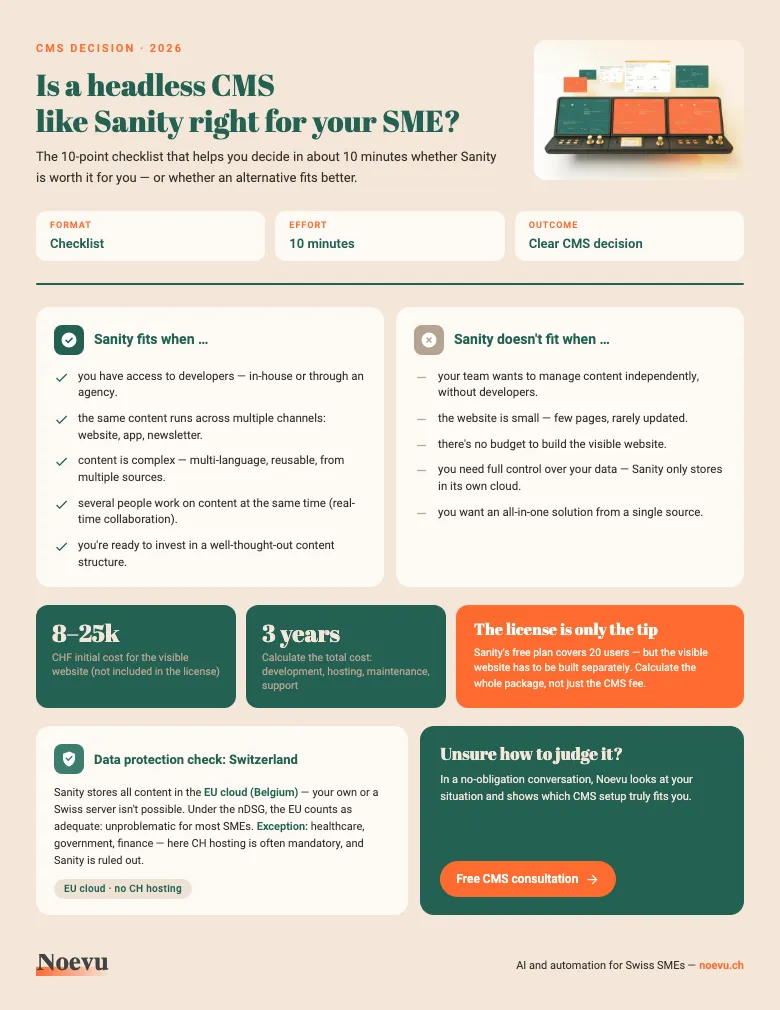
CMS Decision Checklist: Is Sanity Right for Your SME?
The 10-point checklist as a PDF: when Sanity fits and when it doesn't, the hidden costs, and the data-protection check for Swiss SMEs — about 10 minutes to a clear decision.
Thank you. Your download will start shortly.
How Noevu Thinks About Sanity
To place Sanity, Noevu reviewed the major content management systems — from the builders through WordPress to the headless platforms. What remains is a short list, and on that list Sanity ranks high as soon as the starting position fits.
Fitting means concretely: you want a highly professional, clearly laid out editorial system with built-in AI features and a straightforward visual editor. Added to that are the strengths Sanity plays to anyway — multi-language content, multiple output channels (website and app, for instance), a properly guided setup, and willingness to invest in well-thought-out content structure.
The setup — content structure, input forms, the visible website — belongs in professional hands. After that you run the system yourselves: writing posts, adjusting pages, swapping images. Only the underlying design stays within the defined frame, and that is deliberate — the appearance stays consistent no matter who writes. Noevu's service packages cover smaller adjustments and further development without extra budget; the systems are monitored proactively and with AI.
Other starting positions lead to other systems. If the data has to stay in Switzerland, the choice falls on Payload — self-hostable, Swiss servers possible. Anyone with their own technical know-how who enjoys building it themselves, or who simply needs a very small website, is better served by WordPress or Squarespace. Which system fits your situation is settled faster in a short conversation than in any feature comparison.
Conclusion
Sanity CMS is one of the most flexible headless CMS platforms on the market — and that's simultaneously its strength and weakness. The platform rewards teams that think in structures, have the setup professionally guided, and want to treat content as structured data. For these teams, Sanity is an excellent choice.
For small, rarely updated websites, or without budget for a proper setup, Sanity is overkill. The entry barrier sits at the setup, not at daily use — and dependence on a cloud service should be a conscious decision.
If you're still unsure after reading this, that's not a disadvantage — it's the perfect moment to discuss the question with someone who knows various CMS solutions from practical experience.

In a no-obligation conversation, Noevu analyzes the current situation and shows which CMS setup truly fits the business.
Frequently Asked Questions
Is Sanity CMS free?
Yes, Sanity offers a free plan with up to 20 users and 10,000 documents. For most small projects, that's sufficient. Once you need more data requests, bandwidth, or documents, the Growth plan starts at $15 per user per month. The real costs, however, don't come from the license — they come from building and maintaining the website.
Do I need developers for Sanity CMS?
For the initial setup and website development: yes. The admin interface needs technical configuration, and the visible website must be built separately. After setup, content maintenance doesn't require developer skills — the admin interface is usable for editors. Since 2025, AI features like Content Agent ease routine tasks such as translations, bulk edits and quality audits — reducing the need for developer involvement in day-to-day operations.
Where is my data stored with Sanity?
Sanity stores all content in Sanity's own cloud, running on Google Cloud in Europe (Belgium). Under Swiss data protection law (nDSG), the EU is considered an area with adequate protection. For particularly sensitive sectors like healthcare or finance, Swiss hosting may still be a requirement — in which case you can run systems on your own server, like Strapi or Payload.
Can I migrate from WordPress to Sanity?
Yes, migration is possible. Content can be exported via the WordPress REST API and imported into Sanity. The effort depends on your content volume — for 50+ pages with complex layouts, expect 4–8 weeks of project time. Alternatively, WordPress can continue as a headless backend while Sanity is planned as a long-term replacement.
What can Sanity's AI do?
Sanity's Content Agent handles routine tasks that would otherwise take hours: generating content from templates, filling in missing fields across hundreds of documents, translating text into other languages, or editing images via text instructions. All suggestions are saved as drafts and require manual approval. The features have been available since 2025 and are continuously expanding — quality for German content is not yet on par with English.
What is GROQ and why is it relevant?
GROQ is Sanity's own search syntax for finding and organizing content. It lets developers pull content from the system in a single search, instead of making multiple separate requests — which is especially useful when combining content from different sources or building complex pages.