

What the Squarespace Contacts API Is — in Brief
Squarespace has long relied on external services for exchanging data with other tools. With the Contacts API released in April 2026, that changes. An API — short for Application Programming Interface — is a standardised connection that allows two systems to communicate directly. In practical terms: your Squarespace website can share contact data with other tools autonomously, without an intermediary service sitting in between.
The new Contacts API replaces the previous Profiles API. The old interface only allowed reading data — no creating, updating, or deleting. The new Contacts API does all of that. It is the first real step towards an open Squarespace platform for integrations, and opens up possibilities that simply did not exist before.
Profiles API vs. Contacts API: The previous Profiles API is now in maintenance mode — it will not be developed further, but continues to run for the time being. Existing integrations remain functional. All new connections should be built exclusively on the Contacts API.
Why This Was Missing Until Now — and What It Meant in Practice
Anyone running a Squarespace website alongside a CRM has faced a structural problem: Squarespace was an island. New contacts had to be transferred manually — or via services like Zapier, which act as paid intermediaries between systems. A CRM is a tool for managing customer contacts and sales processes. Common solutions include HubSpot, Pipedrive, and the Swiss Bexio.
This sounds like a minor technical issue — in practice, it is a real bottleneck. Zapier quickly costs CHF 70–100 per month at higher volumes. Every connection routed through a third-party service is a potential point of failure.
At Noevu, several client projects were held back by the absence of a direct interface. The requirement was clear: new contacts from Squarespace should flow automatically into the CRM — without paid middleware. The Contacts API removes this bottleneck directly.
What the Contacts API Can Actually Do
The API covers all the operations needed for a complete CRM integration. The key question is not the technical detail, but: what can now be automated that was previously manual?
What Still Doesn't Work — an Honest Assessment
The Contacts API is a genuine step forward. But there are limits worth knowing before you plan or budget.
First, the API requires a Core plan or higher. The Zapier forms connection, by contrast, is also available on the older Business and Commerce Basic plans. Second, Contacts Webhooks now exist, but you can only set them up via OAuth — that is, through a registered Squarespace extension. If you work with a simple API key, you still poll for changes at regular intervals. Third, the API only covers consent for email marketing. SMS marketing consent can be neither read nor changed. Fourth, the Forms API is still missing: form data beyond contact fields is only available through Zapier.
Unsubscribed stays unsubscribed: anyone who has unsubscribed from your newsletter cannot be resubscribed via the API. Squarespace reports the change as successful, but the status stays «unsubscribed». In our test with 101 contacts, the change only took effect for the 15 who had never unsubscribed. People get back on the list by signing up again themselves — for example through a newsletter form.
Direct API vs. Middleware: Which Approach Fits When
Direct API integration and middleware like Zapier are not competitors — they are built for different starting situations. The right choice depends on your technical capacity, budget, and timeline.
| Direct API | Zapier / Make | |
|---|---|---|
| Setup | Developer work required | Drag-and-drop, no code |
| Licence costs | None (API included) | From ~CHF 20–100+/month |
| Reliability | Direct connection, no intermediary | Dependent on third-party provider |
| Scaling | Unlimited, no task limits | Task-based billing |
| Maintenance overhead | Higher initially, then low | Ongoing updates required |
| Best for | Technical teams, long-term stability | Fast setup, minimal IT |
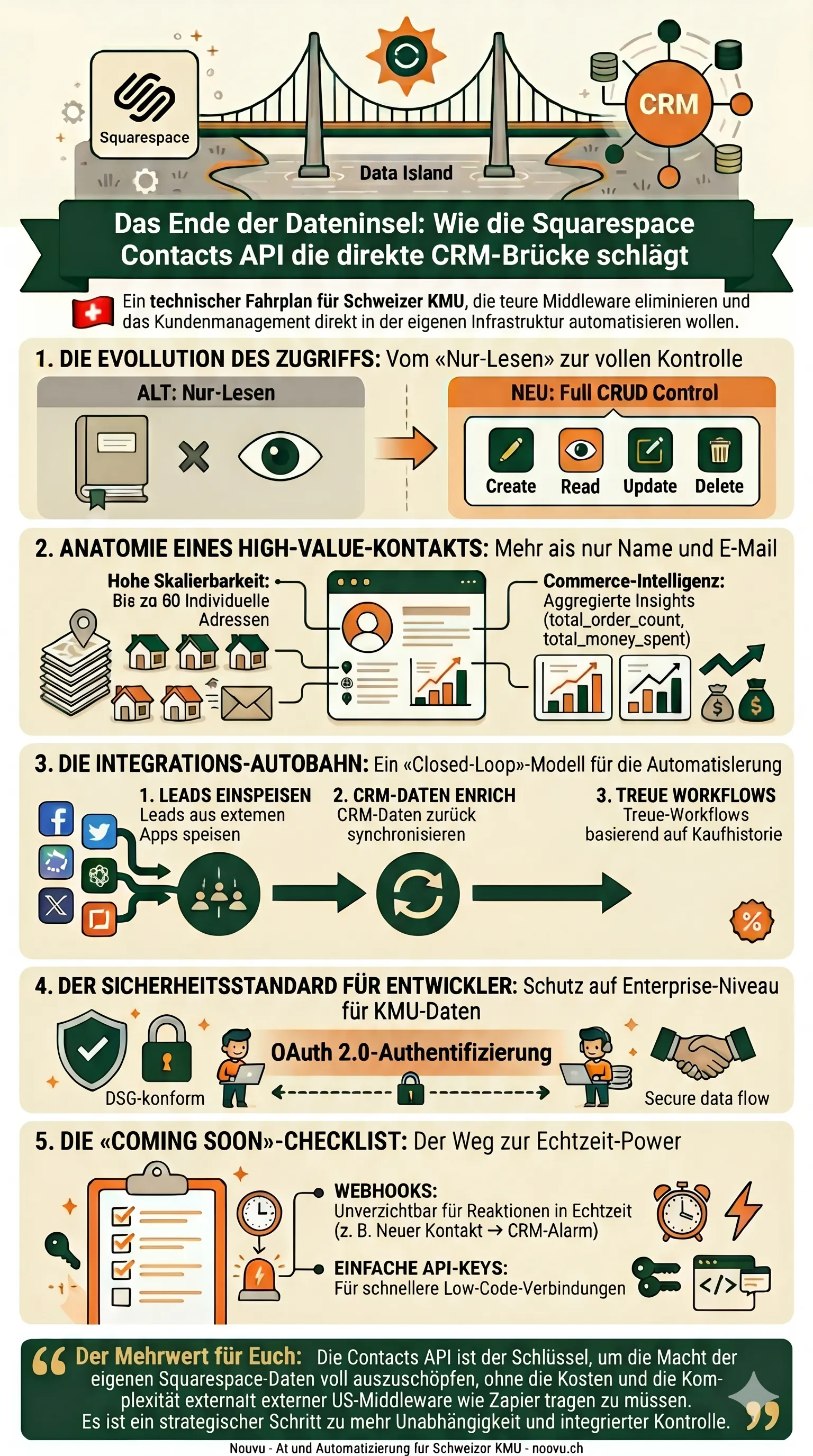
Infographic: Direct API Path vs. Middleware Path
Thank you. Your download will start shortly.
HubSpot, Bexio, Pipedrive: What Direct Integration Looks Like
Three CRM systems dominate the Swiss SME landscape. Each presents a different integration picture — depending on the CRM's own API, available interfaces, and the technical effort.
In all three cases, the same applies: integration is set up once. After that it runs quietly in the background — with no ongoing licence costs for an intermediary service.

For Swiss SMEs, Bexio is a compelling combination: Swiss hosting, open API, multilingual support. A direct Squarespace–Bexio connection was previously only possible via workarounds. The Contacts API turns this into a clean, direct solution — well worth planning for now.
n8n as a Bridge — Automating the Contacts API Without Writing Code
Using the Contacts API doesn't necessarily require a development team. n8n is an open-source automation platform where connections between tools are built visually — without programming code. Via an HTTP node, n8n can call the Squarespace Contacts API directly and pass data to HubSpot, Bexio, Pipedrive, or other tools.
The key difference from Zapier: n8n can be self-hosted on your own server — no additional US service in the data flow. There are also no task-based costs — at high volumes, only server costs apply. This makes n8n particularly interesting for SMEs who want to keep their toolchain lean.
What the Contacts API Means for AI Agents
The Contacts API also opens new doors for AI-powered workflows. An AI agent is a programme that handles tasks autonomously using your data. It can use the API as a tool: query, analyse, and process contacts automatically.
Three possibilities that are already viable today:
Lead qualification: An AI agent checks new contacts automatically for certain criteria and assesses how promising a lead is — without manual evaluation.
Data maintenance: Contact data is automatically completed or cleaned before it moves to the CRM.
Marketing sync: Marketing consents are regularly reconciled between Squarespace and the email tool.
None of these require a large project. Often a structured AI workflow with a few steps is enough.
What's Been Added Since April — and What's Still Missing
At launch, Squarespace announced three extensions. Two of them are now available; the third is still pending.
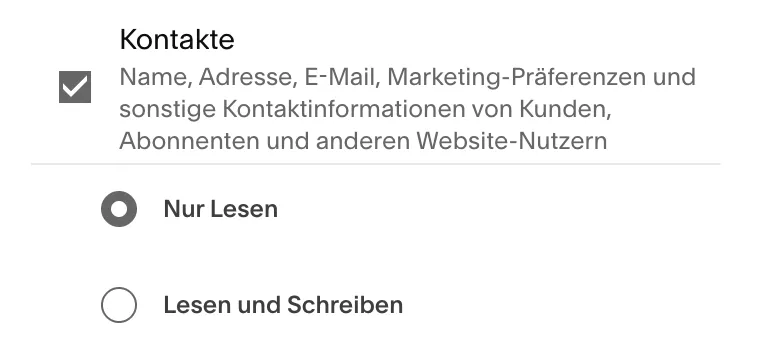
Read only is the default
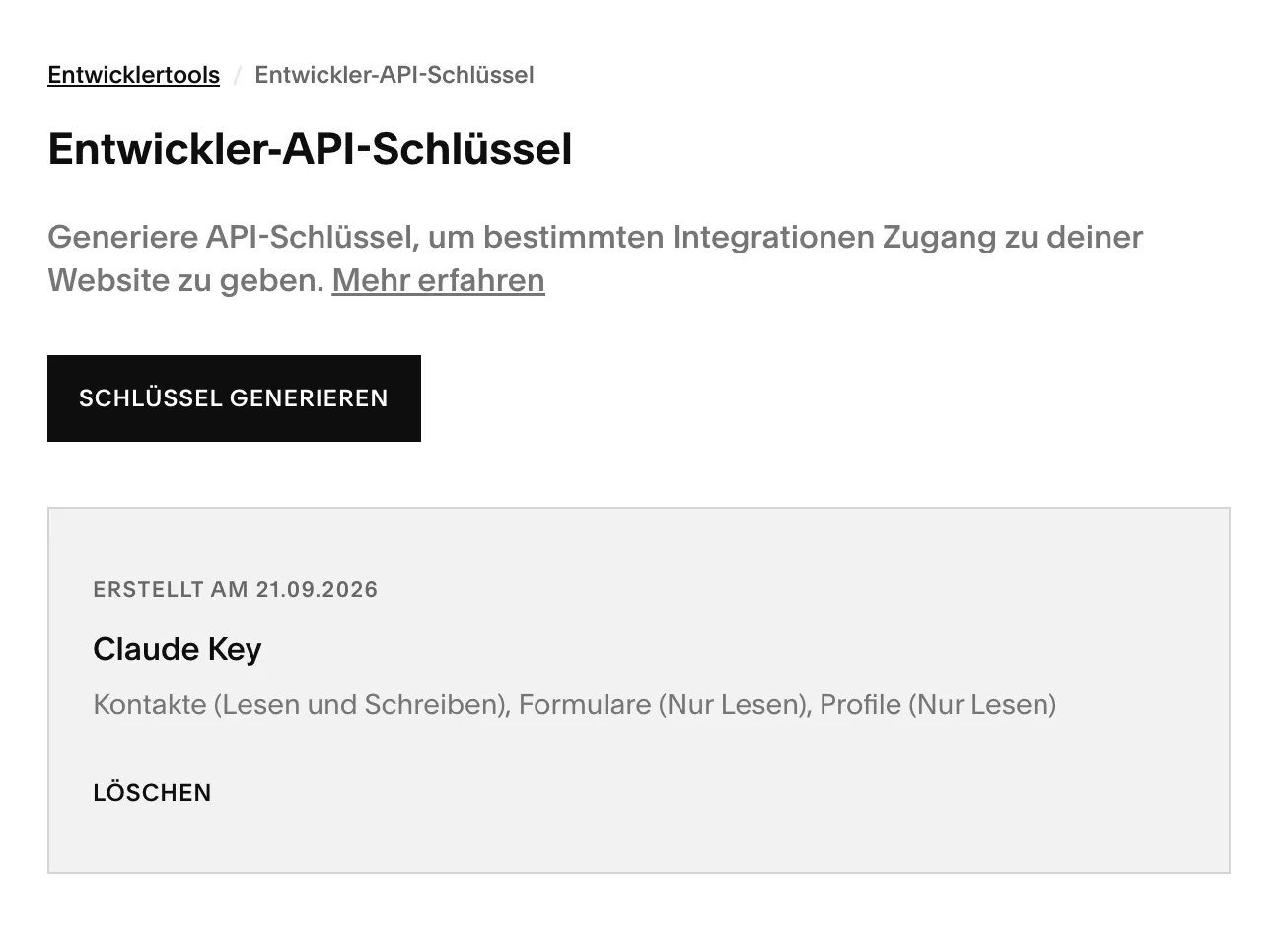
When you create a key, the contacts permission is set to «Read Only». For integrations that write data back, choose «Read and Write» — otherwise the API rejects every change with a permission error.
Conclusion
The Squarespace Contacts API is not a developer feature. It is the tool for anyone running Squarespace as part of a larger system. No more island solution, no paid intermediary, no data protection compromises through US middleware.
For projects starting fresh, a modern custom stack can be the cleaner foundation from the start.
With API keys and webhooks in place, now is a good time to start. Simple integrations run on a key and regular polling; real-time needs an OAuth extension. A short conversation shows which route fits you — and with ongoing website care and support, the question is part of the routine anyway.

Wondering whether direct CRM integration makes sense for your setup — and what it would cost? A short conversation is usually enough to find out.
Frequently Asked Questions
What is the difference between the Contacts API and the old Profiles API?
The Profiles API (now in maintenance mode) only allowed reading contact data. The new Contacts API provides full access: create, read, update, delete, and filter. It also supports address management and purchase history — and is the foundation for all future Squarespace integration capabilities.
Do I need developer expertise to use the Contacts API?
Yes — direct API integration requires a developer or an agency. For SMEs without a technical team, n8n is a more accessible alternative: the open-source platform makes it possible to connect the Squarespace Contacts API visually, without writing code.
What does it cost to use the Squarespace Contacts API?
From the Core plan upwards, the API is included in the price — no additional licence costs. Development work for the integration is a one-time expense. Ongoing costs only arise if you run n8n or a custom integration on your own server.
Are there Squarespace Contacts Webhooks?
Yes. Squarespace reports new, changed and deleted contacts via webhook. However, the webhooks can only be set up via OAuth, that is, through a registered Squarespace extension. With a simple API key, you still poll for changes at regular intervals.
Can I change marketing consent via the API?
For email, yes — with a key set to «Read and Write». Contacts who have unsubscribed stay unsubscribed, though: Squarespace ignores resubscription via the API. SMS marketing consent is not accessible through the API at all.