

Squarespace vs. Webflow: what they actually are
Squarespace and Webflow are both systems that let you run websites without managing classic server infrastructure. Even so, they follow two very different logics. Squarespace is a closed website builder: design, hosting, content management and many business functions come from one source. Webflow is a visual web system that lets designers and agencies control layout, CMS structure and frontend behaviour much more precisely.
A CMS is the place where your website content is managed — where texts, images and pages are created and maintained. The decision should not be based on the nicest demo, but on how well the system fits day-to-day reality. The Squarespace vs. Wix comparison covers the core question well: fewer options are not automatically a weakness if they create less friction.
The real decision is therefore not "which tool wins?" but: How much freedom do you truly need — and who will be responsible for it?
When Squarespace is the better choice
Squarespace is strong when you want to reach a calm, professional website quickly without controlling every single detail. The platform deliberately limits certain freedoms. For many SMEs, that is an advantage, because it reduces configuration mistakes, maintenance effort and visual inconsistency.
A typical example: a Zurich-based consulting firm with 12 employees needs a trustworthy website, a blog, contact forms and perhaps a few landing pages. No one in the team wants to spend time inside modules, collections or layout systems. In this situation, Squarespace is often the smarter choice because the result becomes sustainable faster. The pattern from real Squarespace projects for Swiss SMEs confirms this: when design quality, calm operation and ease of maintenance matter most, Squarespace performs remarkably well.
Squarespace often becomes the most professional option precisely when an SME does not need to configure everything itself. Fewer levers usually lead to the better website because content, imagery and structure stay more consistent.
When Webflow is the better choice
Webflow is not worthwhile simply because it "can do more." It becomes worthwhile when that extra depth is genuinely needed and can be carried organizationally. Webflow is especially strong when layouts need tight control, when content types need clearer modelling, or when SEO and localization logic must be built more deliberately.
A design system is a reusable order for layout, typography, colours and components. For you, that means an agency or internal team can work more consistently because recurring patterns are controlled in a structured way. This matters when a company runs many campaign pages, modular content areas or several language versions with different visual needs. For a growing SME with more layered marketing or multilingual complexity, Webflow can therefore justify the extra effort.
Webflow is not "complicated" because it is badly designed. It is more complex because it hands more responsibility back to you or your agency. That is exactly where its value — and its risk — comes from.
When both are the wrong choice
The most common mistake in this comparison is assuming the decision only happens between Squarespace and Webflow. In practice, there are situations where both miss the mark. If you are planning a larger shop with complex payment logic, subscriptions, ERP connections and Swiss checkout requirements, a more specialised route is often smarter than either of these two all-rounders.
The opposite also happens: teams buy too much system. If your website consists of a few stable pages and rarely changes, you may not need either Webflow or a more ambitious Squarespace setup. And if content will later power a website, app, portal and other channels at the same time, a headless CMS or a more custom architecture may be more appropriate than either option here.
Many teams choose Webflow for prestige or Squarespace for convenience. Both decisions fail when the platform does not fit the maintenance model. The best choice is not the most impressive one, but the most sustainable one.
What must be clarified before you decide
Before you evaluate any demo, first clarify how your business operates. Most bad platform decisions do not come from missing features. They come from misjudging roles, maintenance effort and future growth.
Once these points are answered honestly, it usually becomes clear very quickly whether a calmer system is enough or whether a more flexible setup is justified. This step is missing in many projects — and later leads to unnecessary relaunches or expensive detours.
Checklist before choosing
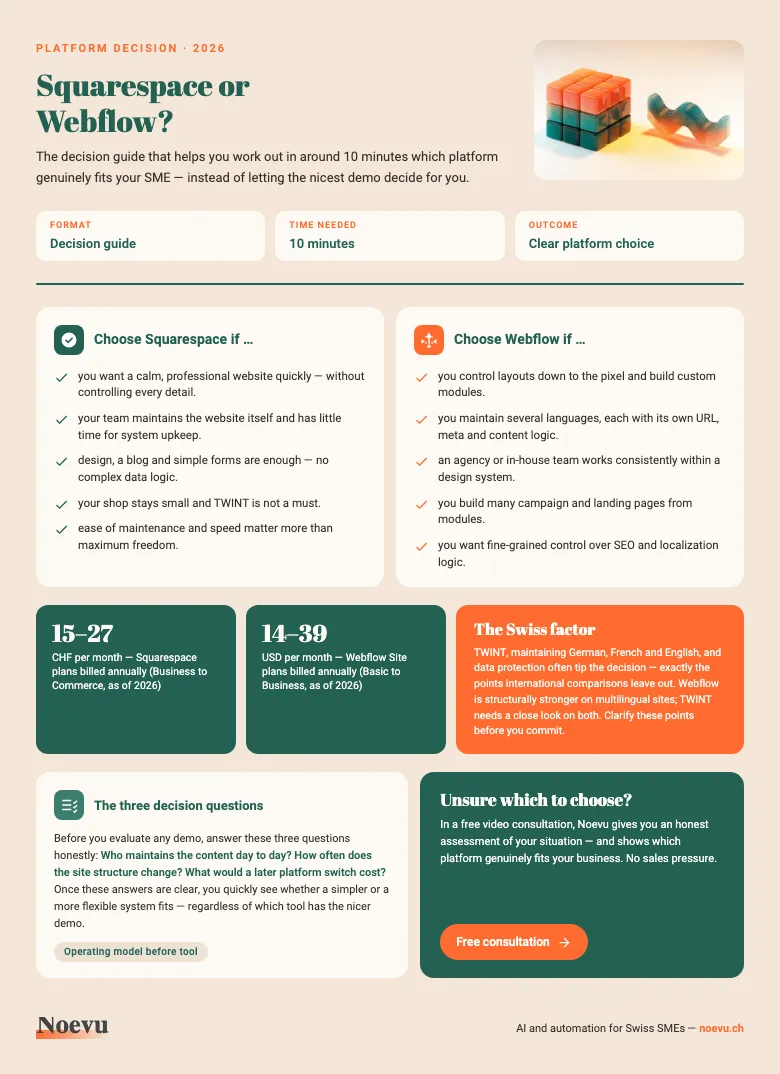
Squarespace or Webflow? The decision guide
The decision guide as a PDF: in around 10 minutes, you work out which platform fits your SME. Includes the Swiss factor (TWINT, multilingual setup) and the three decision questions to answer before you choose.
Thank you. Your download will start shortly.
Design, CMS and multilingual setup compared
For a Swiss SME, the daily reality matters more than the demo. What counts is how content is managed, how languages are maintained and how the site behaves over months and years. That is where Squarespace and Webflow separate more clearly than their interfaces first suggest.
Squarespace is more curated and therefore easier to keep under control. Webflow allows deeper structure in both content and layout, but it requires stronger ownership. There is no objectively best system — only a system that fits or does not fit.
| Squarespace | Webflow | |
|---|---|---|
| Operating logic | Calmer, guided, faster to learn | More flexible, but clearly deeper |
| Design freedom | Strong within template boundaries | Much more precisely controllable |
| Content structure | Enough for typical SME content | Stronger for modular CMS logic |
| Multilingual setup | Possible, but reaches limits sooner | Deeper localization per language |
| SEO control | Solid foundations | More control and more responsibility |
| Daily maintenance | Usually calmer for small teams | Stronger in structured processes |
| Dependency on experts | Often lower | Frequently higher |
| AI focus | Faster start and copy assistance | Workflows, pages, CMS and SEO |
As of March 2026. Features change over time.
SEO, performance and AI features
Webflow is often declared the automatic SEO winner. That is too simplistic. Webflow gives you more control over redirects, localized metadata, CMS-based page logic and technical details. Squarespace handles the basics — metadata, sitemap and clean URLs — reliably. For a typical SME with manageable content, that is often enough.
The bigger shift today comes from AI. Squarespace uses AI mainly to get you to a workable result faster: with Blueprint AI, Design Intelligence and support for text creation. Webflow applies AI more along the production workflow: generating pages, creating sections, setting up CMS collections and supporting SEO or AEO tasks. For you, that means Webflow offers the broader AI workbench, while Squarespace offers the faster AI start.
Squarespace today
Webflow today
What the Swiss market changes in this decision
International comparison articles often miss the points that matter to Swiss SMEs. The first is language. If German, French and English all need to be handled properly, you need more than translation. You need clean control over URLs, metadata, alt texts and sometimes different content per market. Webflow is structurally stronger here.
The second point is payment reality. TWINT is not a side issue in Switzerland. If your site is shop-adjacent, this should be clarified early. The third point is data protection. For many SMEs, a pragmatic, well-documented setup is sufficient; in more sensitive sectors, it is worth clarifying the implications before the platform decision hardens. If that is uncertain, an early conversation via Noevu's contact page is cheaper than a later migration.
How Noevu frames the choice
Noevu would not recommend Webflow to a typical Swiss SME by reflex simply because it looks more modern. If design quality, speed and low-friction maintenance matter most, Squarespace is often the more reasonable decision. If structure, multilingual setup and growth logic matter more, Webflow can justify the extra effort.
The right answer rarely comes from a tool demo. It comes from the business model, the team and the question of whether the website is mainly a communication tool or a growing digital operating asset. That is why Noevu prefers to clarify such choices before implementation, not after launch.

If you are torn between two systems, do not decide by features. Decide by operating model: who maintains the content, how often the structure changes, and what a later migration would cost. Those three questions usually bring more clarity than any comparison chart.
For a more structured approach, a neutral check is often more useful than jumping straight into a redesign. That is exactly why Noevu created the CMS check for Swiss SMEs.
Conclusion
Squarespace is the better choice for many Swiss SMEs when the goal is a professional website with less friction. Webflow is the stronger option when you truly need more structure, more control and more room for growth. The better platform is not the one with the longer feature list, but the one your team can sustain over time.
If you are currently deciding between a rebuild and targeted improvement, it helps to connect the tool choice to the wider strategy. Whether that points more toward a new website or focused optimization rarely depends on the tool alone.

In a no-obligation conversation, Noevu reviews the situation and shows which platform setup makes sense before a relaunch.
Frequently Asked Questions
Is Webflow automatically better for SEO?
No. Webflow gives you more control over structure, redirects and localized SEO. For many SMEs, however, Squarespace already covers the essentials well: metadata, sitemap and understandable URLs. What matters more than the system is whether content, structure and ownership are clearly defined.
Is Squarespace enough for a Swiss SME long term?
Often yes. If you need a website, a blog, simple forms and a manageable shop, Squarespace can be sustainable for years. It becomes limiting when you need highly individual workflows, more complex multilingual setups or deeper content modelling.
Which platform is better for multilingual websites?
Webflow is stronger when you need to control URLs, metadata, visibility rules and content per language in a more granular way. Squarespace can support multiple languages, but it reaches limits faster once German, French and English need to be managed more independently.
Which platform is better for a shop that needs TWINT?
If TWINT is a must, you should look very closely. International comparisons often ignore this, but for Swiss shops it is a real decision factor. If your business model depends heavily on e-commerce, a shop-specific comparison is often wiser than choosing between Squarespace and Webflow alone.
Can I move from Squarespace to Webflow later?
Yes, but not elegantly. Content can be exported or rebuilt manually, yet the design and page logic usually need to be recreated. For you, that means a later migration is possible, but it almost always creates extra work around structure, redirects and content cleanup.