

What is Google Gemini — briefly explained
Google Gemini is Google's AI platform for everyday work. Unlike a pure chatbot, Gemini understands text, images, code and speech at the same time. Specialists call this a multimodal AI — for you it means one tool that combines several tasks in a single interface.
What stands out: Gemini is embedded directly in Google Workspace. Gmail, Google Docs, Drive and Calendar work with Gemini. Not as a separate tool, but as an integrated assistant inside the familiar work environment.
Since April 2026, NotebookLM — Google's knowledge management tool — is also built into the Gemini interface. Upload documents, ask questions and even create audio summaries: it all happens in one place now.
Google Gemini works with a free Google account. Text generation, image analysis and web research are available without a subscription. Advanced features such as Gemini 2.5 Pro start at around CHF 22 per month.
When does Google Gemini make sense?
Not every SME needs Google Gemini. But for companies already working in the Google ecosystem, it is a surprisingly natural choice. The entry point is free and the learning curve is short.
Google Gemini delivers the most value in specific situations. If several of these points apply to your company, a closer look is worthwhile.
What Google Gemini actually does — five use cases
Google Gemini's strength is not a single feature. It lies in the breadth of use cases — directly inside the familiar work environment. Five areas where Swiss SMEs can already benefit today.

Start with the free tier and test Gemini in your daily workflow. Move to Gemini Advanced or a Workspace upgrade only once the basic features hit their limits.

Step by step: how Swiss SMEs build professional infographics with Google Gemini — free and without design skills.
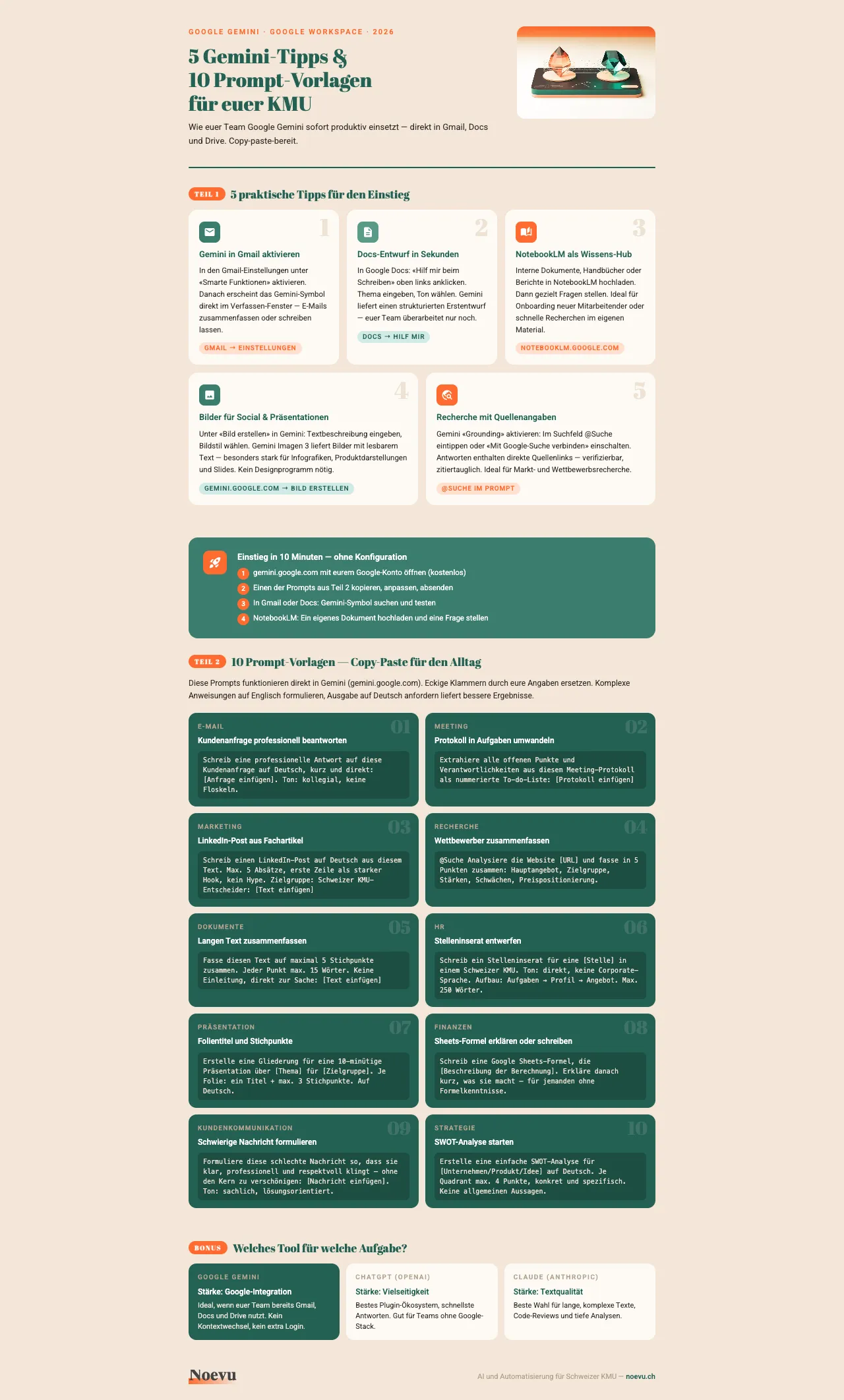
5 Gemini tips and 10 prompt templates for your SME
How your team puts Google Gemini to work right away — with copy-paste-ready prompts for email, marketing, research and more.
Vielen Dank. Der Download startet gleich.
Gemini Free, Advanced and Workspace compared
Google offers Gemini at three levels. The differences come down to model quality, usage limits and enterprise controls. For most Swiss SMEs the free version is enough as a starting point.
| Free | Advanced (~CHF 22/mo) | Workspace Business | |
|---|---|---|---|
| AI model | Gemini 2.0 Flash | Gemini 2.5 Pro | Gemini 2.5 Pro |
| Usage limit | Limited | Extended | Full access |
| Gmail/Docs integration | – | ||
| NotebookLM | Basic | Plus (Audio Overview) | Plus (Audio Overview) |
| Image generation | Limited | Extended (Imagen 3) | Extended (Imagen 3) |
| Admin controls | – | – | |
| Data governance | Standard | Standard | Enterprise level |
Prices in CHF, as of April 2026. Google Workspace Business Standard from around CHF 12 per user per month — AI features included.
Impact on design and digital strategy
Google Gemini changes more than individual work steps. It shapes how SMEs plan and run their digital presence.
For image generation, Gemini delivers usable results for social media posts, blog illustrations and simple marketing graphics. For professional brand visuals with consistent imagery, the tool reaches its limits. The generated images work well as a starting point — not as a replacement for a thought-through visual concept.
New on the scene: Google Stitch, a free prototyping tool from Google Labs that runs on Gemini 2.5 Pro. It turns text descriptions into simple UI drafts. For SMEs that want a first impression of a planned website or app, that's an interesting option — though not a replacement for professional web design.
For content strategy that means: Gemini speeds up drafting copy, summaries and research. The strategic call — which content positions your company — stays a human task. The right AI strategy uses support, not full automation.
What Google Gemini means for SEO
Google Gemini holds a special position in the SEO context. As Google's own AI tool, it shapes how search results get presented.
AI Overviews — the AI-generated summaries above classic search results — run on Gemini technology. For your SME that means content has to be structured so AI systems can read and cite it correctly. Clear definitions, structured lists and explicit recommendations help.
At the same time, Gemini works as a research tool for your own content. The grounding feature delivers source-backed answers, which saves time during topic analysis. But: publishing AI-generated text directly damages search engine optimisation more than it helps. Google rewards expertise and experience. Neither can be automated.
Gemini vs. ChatGPT vs. Claude — an honest take
The three big AI assistants differ less in their core features than in their focus. For Swiss SMEs the question is not «Which tool is best?» More important: which one fits your existing way of working?
| Google Gemini | ChatGPT (OpenAI) | Claude (Anthropic) | |
|---|---|---|---|
| Biggest strength | Google integration | Versatility | Text quality and analysis |
| Free tier | Yes (generous) | Yes (limited) | Yes (limited) |
| Image generation | Imagen 3 (very good) | DALL-E 3 (good) | No |
| Data connections | Google Workspace | Plugins and GPTs | MCP integrations |
| Web research | Grounding (current) | Browse (current) | Limited |
| Best fit for | SMEs in the Google stack | Versatile users | Text-heavy work |
As of April 2026. All three platforms evolve quickly.
Gemini wins on integration into existing Google workflows. ChatGPT offers the broadest plugin ecosystem and the fastest response times. Claude shines on long texts, complex analysis and code. All three are serious tools — the question is not whether but how AI is used.
Many SMEs pick their AI tool based on press coverage or recommendations from their network. What actually counts is which tool fits the existing work environment. A team on Google Workspace gets more from Gemini than from the technically stronger Claude — because the integration makes the difference.
How Gemini is used at Noevu
Gemini is part of the daily work environment at Noevu. Not as an experiment, but as a fixed part of the Google Workspace stack.
Concretely, Gemini comes into play for image generation and image adjustments. When drafts for client projects or blog illustrations take shape, Gemini delivers fast first variants. The final visual language is then refined deliberately — with specialised tools like Ideogram for the final quality.
For access to client data and internal documents, the Workspace integration carries the load. Email summaries, meeting notes and document analysis: Gemini handles the routine work so strategic work stays in focus.
The verdict after several months of use: Gemini is not a universal tool. But inside the Google ecosystem it is the most productive AI tool in our daily routine. You occasionally feel slower response times compared to Claude. The direct integration into the working day balances that out.
Gemini works best as a complement, not a replacement. The strongest results come when AI-generated drafts get refined by human expertise — especially in client communication and brand presence.
Conclusion
Google Gemini is not an all-rounder. But for SMEs in the Google ecosystem it is the AI tool with the lowest entry effort and the fastest payoff.
The strengths sit in the integration: Gmail, Drive, Docs and Calendar work with Gemini without setting up a separate tool. NotebookLM extends the reach into knowledge management, and image generation with Imagen 3 covers visual content.
For text-heavy work or complex programming, ChatGPT or Claude can be the better choice. The decision should follow the daily work — not feature lists or press coverage.
Anyone starting with AI today and already using Google finds the simplest entry point in Gemini. And anyone further along discovers new options with Gemini CLI, Gems and Google Stitch.

Which AI tool fits your situation? A short conversation brings clarity — no sales pressure.
Frequently Asked Questions
Is Google Gemini really free?
Yes. A free Google account unlocks text generation, image analysis and web research. The free version uses the Gemini Flash model. Advanced features such as Gemini 2.5 Pro, unlimited use and NotebookLM Plus come with Gemini Advanced from around CHF 22 per month. For teams on Google Workspace Business Standard, AI features are already included in the subscription.
Does Google Gemini understand German?
Yes. Gemini understands and generates text in over 40 languages, including German. Quality is slightly higher with English prompts, but for everyday business — email drafts, summaries, research — German output is good enough. Tip: write complex instructions in English and request the output in German.
How safe is company data with Google Gemini?
The free version and Gemini Advanced fall under Google's standard privacy policy. Inputs may be used to improve the model. With Google Workspace Business and Enterprise, business data is not used for model training — corporate data processing terms apply instead. Swiss SMEs already on Google Workspace sit at the same privacy level as for Gmail or Drive.
What is the difference between Google Gemini and ChatGPT?
Gemini is embedded directly in the Google stack (Gmail, Docs, Drive, Calendar). ChatGPT is positioned more as a standalone tool with a broader plugin ecosystem. Gemini wins on Workspace integration and image generation, ChatGPT on versatility and response speed. For SMEs already running on Google, Gemini is often the simpler entry point.
Can Google Gemini be connected to business software?
Yes, in several ways. Inside Google Workspace, Gemini works directly with Gmail, Docs, Sheets and Meet. Through Gemini Gems you can build specialised AI assistants. Technically minded teams can use the Gemini CLI with the MCP protocol to connect external tools — accounting software like Bexio, for example.